

System Requirements
System Requirements for Whols
Before installing Whols, make sure your website meets the required WordPress, WooCommerce, PHP, database, and server settings. Using the recommended environment helps Whols run smoothly with wholesale pricing, registration, dynamic rules, cart, checkout, and order-related features.
Minimum Requirements
| Requirement | Minimum Version |
|---|---|
| WordPress | 5.0 or higher |
| WooCommerce | 7.0 or higher |
| PHP | 7.4 or higher |
| MySQL | 8.0 or higher |
| MariaDB | 10.5 or higher |
Recommended Requirements
| Requirement | Recommended Version |
|---|---|
| WordPress | Latest stable version |
| WooCommerce | Latest stable version |
| PHP | 8.3 or higher |
| MySQL | 8.0 or higher |
| MariaDB | 10.6 or higher |
| WordPress Memory Limit | 256 MB or higher |
| HTTPS | Enabled for live stores |
WordPress Requirements
Whols requires WordPress 5.0 or higher. For better security, performance, and compatibility, we recommend using the latest stable version of WordPress.
How to Check Your WordPress Version
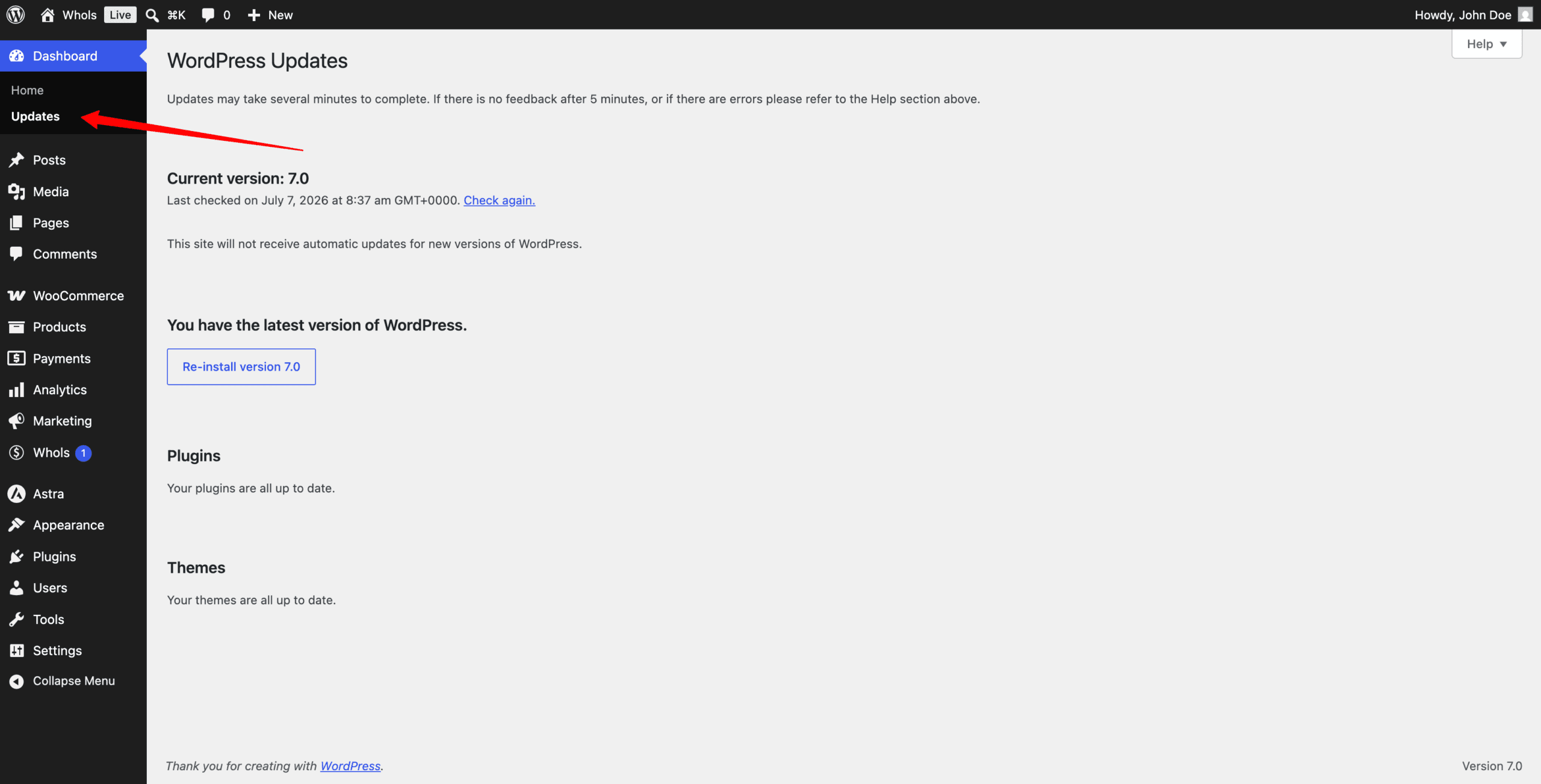
- Go to WordPress Dashboard > Updates.
- Check your current WordPress version.
- Update WordPress if your site is using an older version.
- Take a full backup before updating.
WooCommerce Requirements
Whols is built for WooCommerce. WooCommerce must be installed and activated before using Whols.
| Item | Requirement |
|---|---|
| Minimum WooCommerce Version | 7.0 or higher |
| Recommended WooCommerce Version | Latest stable version |
How to Check Your WooCommerce Version
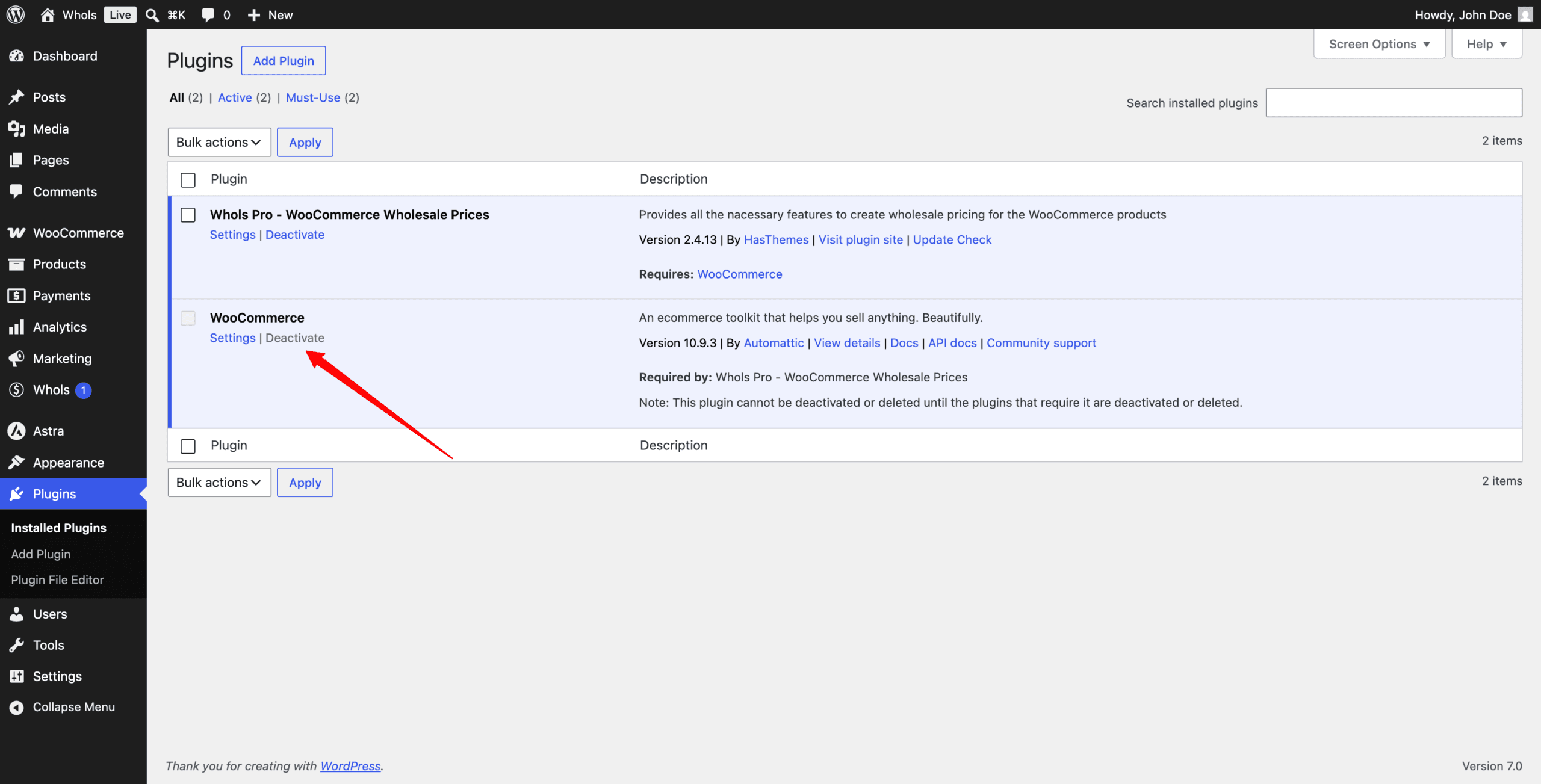
- Go to Plugins > Installed Plugins.
- Find WooCommerce.
- Check the installed version.
- Update WooCommerce if needed.
PHP Requirements
Whols requires PHP 7.4 or higher. For better performance and security, PHP 8.3 or higher is recommended.
| Item | Requirement |
|---|---|
| Minimum PHP Version | 7.4 or higher |
| Recommended PHP Version | 8.3 or higher |
| PHP Memory Limit | 256 MB or higher |
| Max Execution Time | 120 seconds or higher |
| Max Input Vars | 3000 or higher |
Database Requirements
Whols uses WordPress and WooCommerce data to manage wholesale pricing, customer roles, registration settings, and order-related features.
| Database | Minimum Version | Recommended Version |
|---|---|---|
| MySQL | 8.0 or higher | 8.0 or higher |
| MariaDB | 10.5 or higher | 10.6 or higher |
Recommended Server Settings
For a stable WooCommerce wholesale store, use the following server settings:
| Server Setting | Recommended Value |
|---|---|
| WordPress Memory Limit | 256 MB or higher |
| PHP Memory Limit | 256 MB or higher |
| Max Execution Time | 120 seconds or higher |
| Max Input Vars | 3000 or higher |
| Upload Max Filesize | 64 MB or higher |
| Post Max Size | 64 MB or higher |
| cURL | Enabled |
| OpenSSL | Enabled |
| HTTPS | Enabled |
WooCommerce HPOS Compatibility
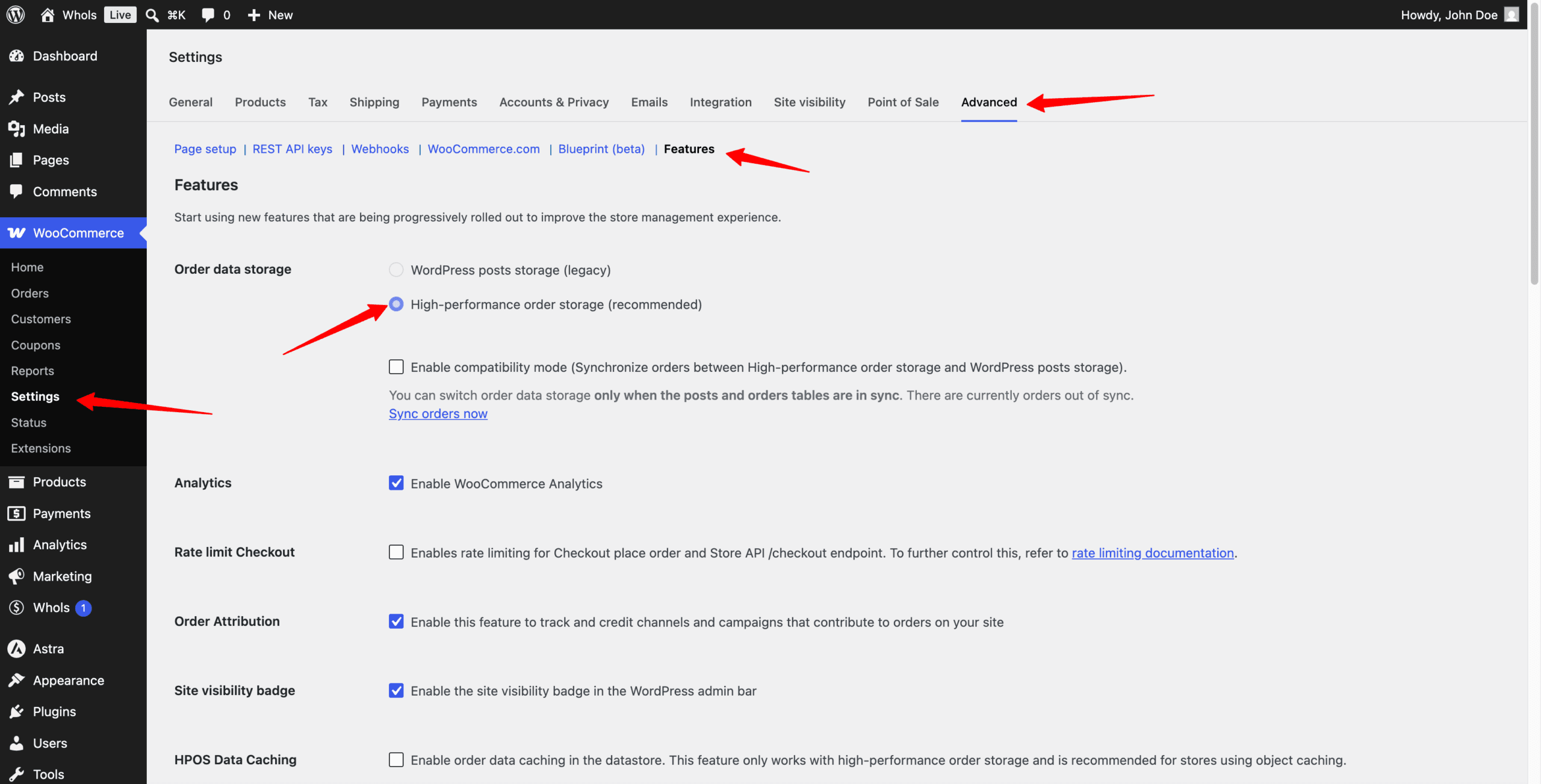
HPOS stands for High-Performance Order Storage. It is a WooCommerce feature that stores order data in dedicated database tables for improved order performance.
If your store uses Whols features related to orders, cart, checkout, payment methods, or customer order history, test HPOS on a staging site before using it on a live store.
HPOS Testing Checklist
- Create a staging copy of your website.
- Update WordPress, WooCommerce, and Whols.
- Enable HPOS on the staging site.
- Place a test order as a wholesale customer.
- Check cart and checkout pricing.
- Check admin order details.
- Check customer order history.
- Confirm that order-related Whols features work correctly.
Troubleshooting Requirement Issues
| Issue | Possible Reason | Recommended Fix |
|---|---|---|
| Whols settings do not save | Low memory or server limit | Increase memory limit and max input vars |
| Import/export fails | Large file or low server limit | Increase upload size and execution time |
| Website becomes slow | Low memory or weak hosting | Use recommended server settings |
| Order-related issue after HPOS | HPOS not tested properly | Test HPOS on staging before production |
| PHP error appears | Outdated PHP version | Upgrade PHP to the recommended version |
FAQ
What is the minimum WordPress version required for Whols?
Whols requires WordPress 5.0 or higher.
What is the minimum WooCommerce version required for Whols?
Whols requires WooCommerce 7.0 or higher.
What PHP version should I use?
Whols requires PHP 7.4 or higher. PHP 8.3 or higher is recommended.
Does Whols require WooCommerce?
Yes. WooCommerce must be installed and activated before using Whols.
Where can I check my website system information?
Go to WooCommerce > Status and review the System Status tab.
Should I test HPOS before using it?
Yes. If your store uses order-related Whols features, test HPOS on a staging site before enabling it on a live store.
Last updated on July 7, 2026
Was this article helpful?
Powered by Support Genix