

Common Conditions
Use Common Conditions to control rule activation based on basic cart and checkout data.
Configuration Overview
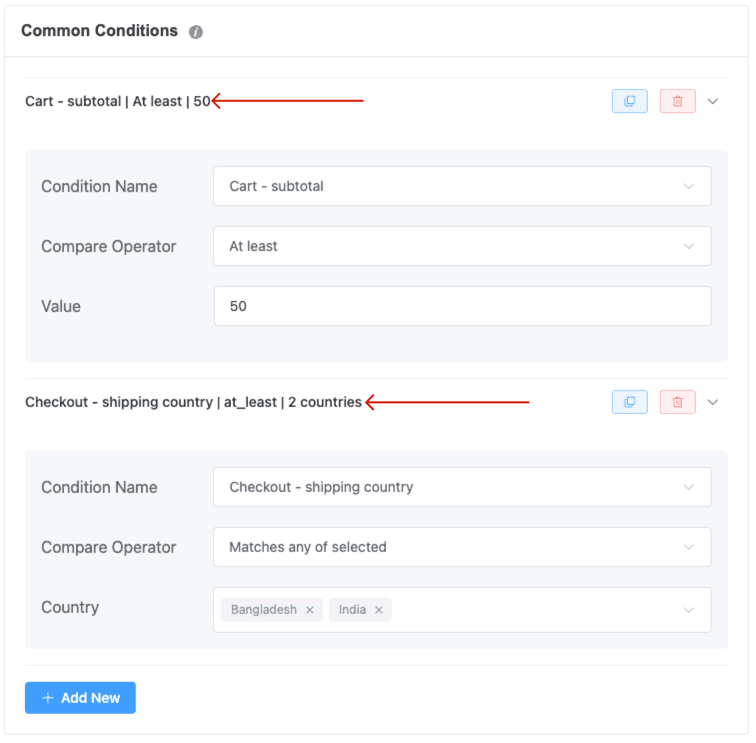
Available Fields:
- Cart – subtotal
Compare the cart’s subtotal to a numeric value (e.g., at least $50). - Cart – total quantity
Specify the minimum or maximum total quantity of items in the cart (e.g., exactly 10, at most 20). - Cart – item count
Filter based on the number of distinct products in the cart (e.g., at least 3 different SKUs). - Checkout – shipping country
Restrict rule to orders shipping to one or multiple specified countries (e.g., Bangladesh, India).
How It Works
- You can add one or multiple Common Conditions—all must be satisfied for the rule to apply.
- Choose a Condition Name, a Compare Operator (e.g., at least, at most, equals), and enter the Value or Country accordingly.
- Common Conditions are optional; if none are added, the rule doesn’t filter by cart or checkout metrics.
Real-Life Examples
- Cart – subtotal ≥ $50 — trigger the rule once the cart reaches $50.
- Cart – total quantity ≥ 10 — ideal for incentivizing bulk purchases.
- Cart – item count ≤ 3 — perfect for promotions on small, targeted orders.
- Checkout – shipping country = Bangladesh — apply rules only for orders shipping to Bangladesh.
Tips & Best Practices
- Combine multiple Common Conditions for precision:
- E.g., Cart – subtotal ≥ $100 AND Cart – total quantity ≥ 5.
- Use with other condition types (User, Scheduling, History) to craft targeted rule logic.
- Useful across all Dynamic Rules actions—discounts, free shipping, payment control, and more.
Last updated on December 24, 2025
Was this article helpful?
Powered by Support Genix