


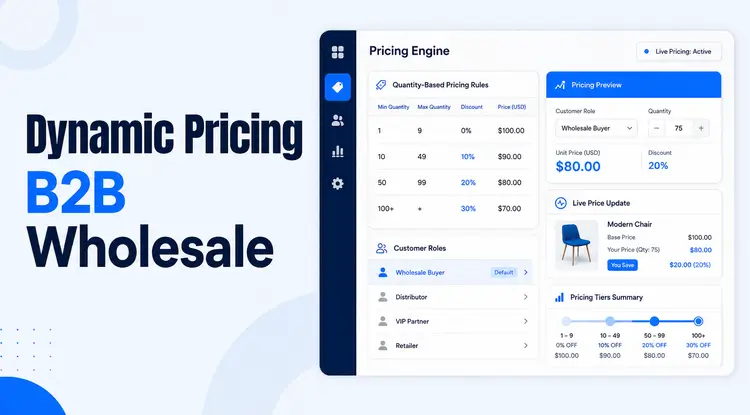
Quick Answer
B2B wholesale dynamic pricing automatically adjusts prices, discounts, fees, shipping, or payment options when predefined customer, product, cart, quantity, or timing conditions are met. Advanced systems may also use cost, inventory, demand, or market data. The goal is to offer appropriate prices while protecting margins and keeping every rule clear, consistent, and testable.
Wholesale sellers need to reward valuable buyers without giving away too much profit. That becomes difficult when prices are managed through spreadsheets, outdated price lists, and one-off discounts approved by sales representatives.
Dynamic Pricing in B2B Wholesale replaces much of that manual work with predefined logic. A seller can decide who qualifies, what must happen in the cart, which products are involved, and what action the store should take. The system then applies the rule consistently whenever those conditions are met.

This guide explains how dynamic wholesale pricing works, how it differs from tiered and algorithmic pricing, which models are most useful, and how to configure rules in WooCommerce with Whols.
Table of Contents
Key Takeaways
- Rules-based dynamic pricing responds to predefined customer, cart, product, quantity, location, history, or scheduling conditions.
- A profitable rule starts with a margin limit, not a discount percentage.
- Tiered pricing and volume pricing can be part of a wider dynamic-pricing strategy, but they are not identical.
- Whols Pro can automate cart discounts, fees, BOGO offers, free shipping, and payment controls through Dynamic Rules.
- Every rule should be tested against qualifying, non-qualifying, and overlapping scenarios before customers rely on it.
What Is Dynamic Pricing in B2B Wholesale?
Dynamic pricing in B2B wholesale is a pricing approach in which a store automatically changes a price, discount, fee, shipping benefit, or checkout option when defined business conditions are satisfied.
Those conditions may include:
- Customer type or wholesale role
- Cart subtotal
- Total quantity in the cart
- Number of distinct products
- Specific products or categories
- Shipping country
- Customer order history
- Promotion dates, days, or times
For example, a store might give Gold wholesale customers 10% off the entire cart when they buy at least 50 units and spend $1,000 or more. The rule applies only when every required condition is met.
Dynamic pricing does not have to mean constantly changing prices. In a B2B environment, it is often better understood as conditional pricing automation: the seller defines the commercial logic, and the system applies it consistently.
Rules-Based vs. Algorithmic Dynamic Pricing
These two approaches solve different problems.
Rules-based pricing
Rules-based pricing follows conditions selected by the store owner. Examples include:
- Give approved distributors 10% off orders above $500.
- Apply free shipping to Gold wholesale customers.
- Add a handling fee to orders shipped to selected countries.
- Run a BOGO promotion during a defined campaign period.
This approach is transparent, predictable, and relatively easy to test.
Algorithmic pricing
Algorithmic pricing uses software models to calculate or recommend prices from larger datasets. It may consider demand, inventory, competitor movement, buyer behavior, or changing input costs.
This approach normally requires dedicated pricing software, reliable data, and sometimes ERP or marketplace integrations.
Most small and midsize WooCommerce wholesalers should begin with rules-based pricing. It is easier to explain to buyers, easier to govern internally, and less likely to create unexpected price changes.
Whols supports rules-based pricing. It does not natively monitor competitor prices, forecast demand, or import commodity-cost changes from an ERP without additional integration.
How Dynamic Pricing Works in B2B Wholesale
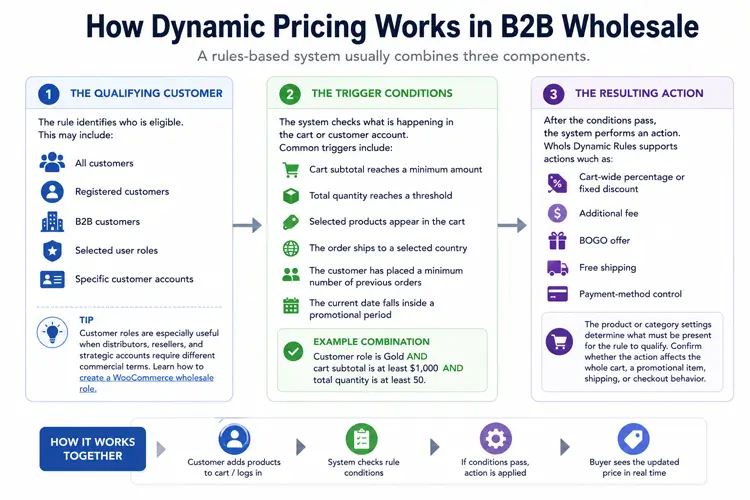
A rules-based system usually combines three components.
1. The qualifying customer
The rule identifies who is eligible. This may include:
- All customers
- Registered customers
- B2B customers
- Selected user roles
- Specific customer accounts
Customer roles are especially useful when distributors, resellers, and strategic accounts require different commercial terms. Store owners who have not created these segments yet can follow this guide on how to create a WooCommerce wholesale role.
2. The trigger conditions
The system checks what is happening in the cart or customer account. Common triggers include:
- Cart subtotal reaches a minimum amount
- Total quantity reaches a threshold
- Selected products appear in the cart
- The order ships to a selected country
- The customer has placed a minimum number of previous orders
- The current date falls inside a promotional period
Multiple conditions can be combined. For example:
Customer role is Gold AND cart subtotal is at least $1,000 AND total quantity is at least 50.
3. The resulting action
After the conditions pass, the system performs an action. Whols Dynamic Rules supports actions such as:
- Cart-wide percentage or fixed discount
- Additional fee
- BOGO offer
- Free shipping
- Payment-method control
The product or category settings determine what must be present for the rule to qualify. Store owners should still confirm whether the selected action affects the whole cart, a promotional item, shipping, or checkout behavior.
Dynamic Pricing vs. Tiered Pricing vs. Volume Pricing
| Pricing model | How it works | Best suited for |
|---|---|---|
| Dynamic pricing | Applies an action automatically when predefined customer, cart, product, history, location, or timing conditions are met | Stores with multiple buyer groups or more complex promotional logic |
| Tiered pricing | Defines stable price levels for specific roles or quantity bands | Predictable account and product pricing |
| Volume pricing | Lowers the unit price when the purchased quantity reaches a threshold | Traditional bulk-order incentives |
Tiered and volume pricing may operate inside a wider dynamic-pricing strategy. For example, a Gold customer may receive a role-based product price, while a separate cart rule adds free shipping when the order exceeds $1,000.
Whols provides role-based simple and tiered product pricing separately from its Dynamic Rules actions. This distinction matters because a cart discount is not the same as changing the unit price of a product.
Why Pricing Precision Matters
A discount affects profit more aggressively than it may appear to affect the selling price.
Consider a wholesaler selling a product for $100 with a landed cost of $70.
| Pricing situation | Selling price | Gross profit | Gross margin |
| Standard wholesale price | $100 | $30 | 30.0% |
| 5% discount | $95 | $25 | 26.3% |
| 10% discount | $90 | $20 | 22.2% |
| 15% discount | $85 | $15 | 17.6% |
A 10% discount reduces gross-profit dollars from $30 to $20. That is a 33.3% reduction in gross profit, even though the selling price falls by only 10%.
This is why a pricing rule should begin with four questions:
- What is the lowest acceptable selling price?
- What additional volume or customer value justifies the discount?
- Can multiple rules combine and push the order below the margin floor?
- How will the seller measure whether the rule increased profitable revenue?
A Practical B2B Dynamic-Pricing Example
Assume a wholesaler wants to reward established distributors without offering the same discount to every buyer.
Business objective
Increase larger distributor orders while preserving at least $20 gross profit per unit.
Proposed rule
- Eligible customer: Gold wholesale role
- Required product: Any product from the Accessories category
- Minimum total quantity: 50 units
- Minimum cart subtotal: $1,000
- Action: 10% cart discount
- Availability: September 1–30
Validation process
Test at least four carts:
- Gold customer, 50 units, subtotal above $1,000 — rule should apply.
- Gold customer, 40 units — rule should fail.
- Retail customer, 50 units — rule should fail.
- Gold customer with another active discount — verify the final margin and rule priority.
This simple test prevents a rule from being approved based on only one successful checkout.
How to Design a Profitable Pricing Rule
Use the following framework before configuring anything in WooCommerce.
Customer
Define exactly who qualifies. Avoid broad rules such as “all registered users” unless the benefit genuinely applies to every account.
Trigger
Choose the buyer behavior that should unlock the benefit. Examples include higher order value, larger quantity, repeat purchasing, or buying selected products.
Margin limit
Calculate the minimum selling price or gross margin before choosing the discount. Do not assume that a higher order automatically produces enough profit.
Action
Select the smallest incentive likely to produce the desired behavior. A free-shipping benefit may be more profitable than an additional percentage discount.
Priority
Decide what happens when several rules qualify. Rules may need to stack, remain mutually exclusive, or be evaluated in a defined order.
Review
Review the rule after enough orders have been collected. Check conversion rate, average order value, gross profit, discount cost, and buyer retention rather than judging performance from revenue alone.
Setting Up Dynamic Pricing in B2B Wholesale Rules in WooCommerce with Whols

Whols is a WooCommerce wholesale plugin that lets store owners automate predefined pricing, promotion, shipping, fee, and payment logic without writing code. The Dynamic Rules feature requires WooCommerce and Whols Pro to be active.
The complete documentation is available in the Whols Dynamic Rules knowledge base.
Step 1: Open Dynamic Rules
Go to:
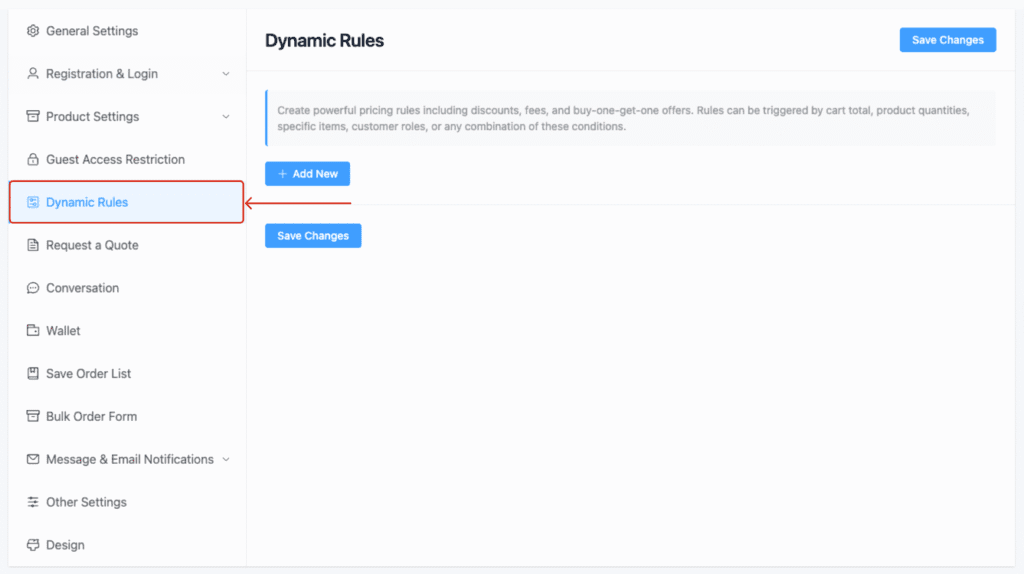
WordPress Dashboard → Whols → Settings → Dynamic Rules
Select Add Rule and give the rule a clear internal label. A label such as “Gold role — 10% off over $1,000 — September” is easier to audit than “Rule 3.”
Step 2: Choose the action
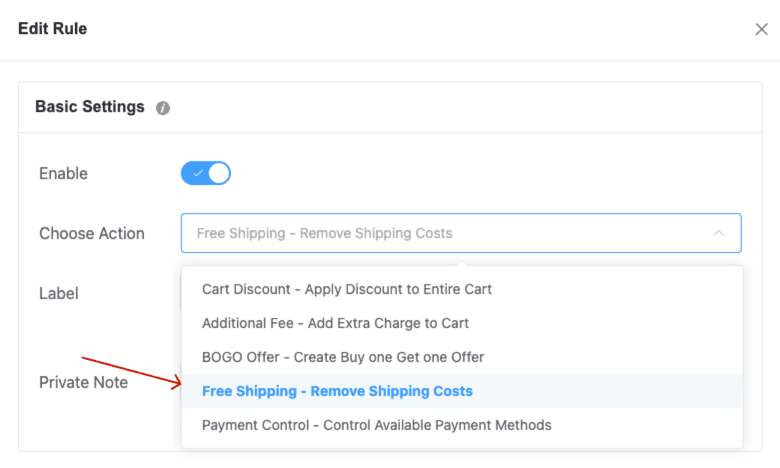
Select the outcome the rule should create:
- Cart Discount
- Additional Fee
- BOGO Offer
- Free Shipping
- Payment Control
For a discount or fee, choose a percentage or fixed amount. Role-based tiered product prices are configured separately in Whols’ pricing settings.
For a complete walkthrough, see How to Create Dynamic Pricing Rules Using Whols.
Step 3: Set product conditions
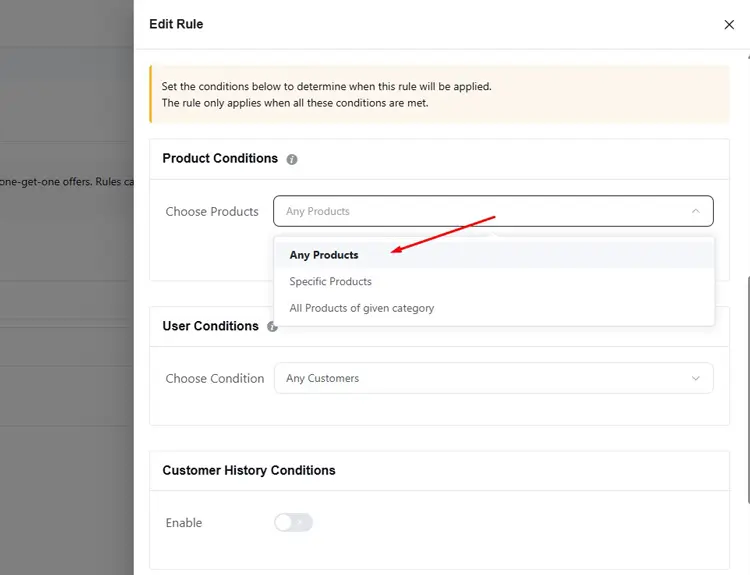
Choose whether the cart may contain:
- Any product
- Specific products
- Products from selected categories
Then choose whether the rule requires any, all, or none of the selected items.
These settings determine which products trigger the rule. They do not automatically mean that only those products receive the resulting cart action.
Step 4: Set user conditions
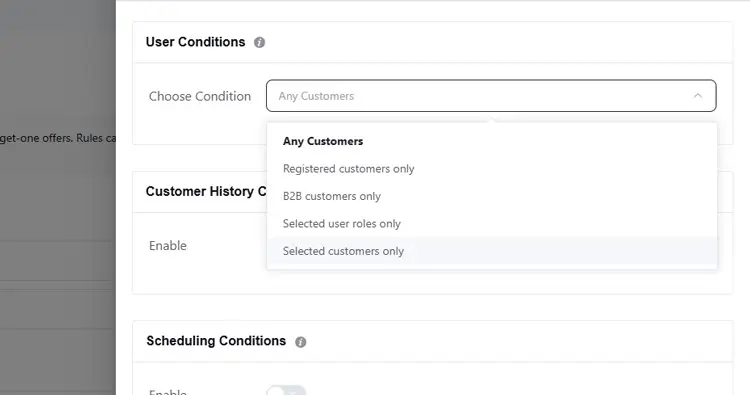
Choose who can qualify:
- All customers
- Registered customers
- B2B customers
- Selected user roles
- Selected customers
Use the narrowest condition that matches the business goal.
Step 5: Add common conditions
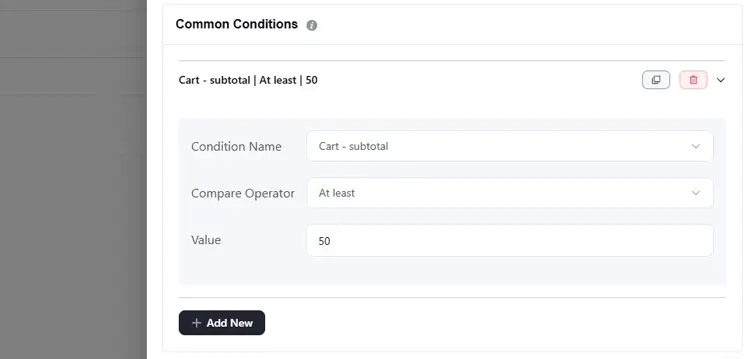
Whols can evaluate:
- Cart subtotal
- Total cart quantity
- Distinct item count
- Checkout shipping country
When several common conditions are added, all must pass for the rule to apply. The Common Conditions documentation explains the available fields and comparison operators.
Step 6: Add scheduling or history conditions
Use scheduling when a rule should operate only during selected dates, days, or times. Customer-history conditions can restrict an offer according to previous order count or spending behavior.
These controls are useful for targeted campaigns, but they should not replace checking current-order profitability.
Step 7: Test with Rules Inspector
Save the rule and test it with an administrator account. The Dynamic Rules Inspector displays rule behavior on WooCommerce cart and checkout pages.
It can show whether a rule was:
- Applied
- Failed
- Skipped
- Inactive
It also shows which conditions passed or failed, along with useful cart information. The tool is admin-only and is not shown to customers.
Whenever possible, perform the first tests on a staging site. Then repeat the test on the production store using controlled accounts and carts.
Common Dynamic-Pricing Mistakes
Applying discounts before calculating margin
A visually small discount can remove a large share of gross profit. Calculate the final selling price first.
Confusing cart discounts with product prices
A cart-wide discount changes the order total. Role-based or tiered product pricing changes the product price shown to an eligible buyer. Choose the mechanism that matches the desired customer experience.
Creating overlapping rules without a policy
Two individually profitable rules may become unprofitable when combined. Test all realistic combinations and document whether rules can stack.
Using product conditions as if they limit the action
A selected product may trigger a cart-wide action. Confirm the scope of the action rather than relying only on the qualifying product condition.
Treating rules as “set and forget”
Review active rules whenever costs, shipping charges, tax treatment, contracts, or buyer behavior change materially. A quarterly review can be a practical starting point, but volatile businesses may need more frequent checks.
Overstating automation
Rules-based tools automate the logic you configure. They do not automatically forecast demand, monitor competitors, or synchronize changing ERP costs unless those capabilities are supplied by additional systems.
Dynamic-Pricing Launch Checklist
Before activating a rule, confirm that:
- The intended customer group is clearly defined.
- The minimum acceptable margin has been calculated.
- The action and its cart-level or product-level scope are understood.
- Product and category triggers are correct.
- Every threshold uses the correct operator.
- Start and end dates are accurate.
- Logged-in and guest scenarios have been tested where relevant.
- Qualifying and non-qualifying carts behave correctly.
- Overlapping coupons, role prices, and Dynamic Rules have been tested.
- Taxes, shipping, payment methods, and currency display correctly.
- Rules Inspector shows the expected status and condition results.
- The internal label and private note explain the commercial purpose.
- A review date and rule owner have been assigned.
Whols- WooCommerce Wholesale Plugin
Manage your WooCommerce online store with more ease and efficiency with this feature-rich plugin.
Frequently Asked Questions
What is B2B wholesale dynamic pricing?
B2B wholesale dynamic pricing automatically changes a price, discount, fee, shipping benefit, or checkout option when predefined customer, product, cart, quantity, history, location, or timing conditions are met.
What is an example of dynamic pricing in wholesale?
A store could give Gold distributors 10% off when they purchase at least 50 units and spend $1,000. The rule would apply automatically only when the customer role, quantity, and subtotal conditions all pass.
Is dynamic pricing the same as personalized pricing?
No. Dynamic pricing may use general conditions such as order quantity or campaign dates. Personalized pricing normally considers a particular customer, account, role, contract, or purchase history. A pricing strategy can use both approaches together.
Is tiered pricing a type of dynamic pricing?
Tiered pricing can be part of a dynamic-pricing system because the applicable price changes when a buyer reaches a quantity or account threshold. However, tiered prices are predefined and usually more stable than demand- or market-driven algorithmic prices.
Can WooCommerce support B2B dynamic pricing?
WooCommerce does not include advanced B2B pricing rules by default. A wholesale plugin such as Whols can add role-based product pricing and conditional actions based on customers, products, cart values, quantities, locations, schedules, and customer history
Can Whols Dynamic Rules change individual product prices?
Whols Dynamic Rules can apply cart discounts and other conditional actions. Role-based simple and tiered product prices are configured through separate product-pricing settings. Store owners should choose the feature that matches whether they want to change displayed unit prices or the final cart total.
Can multiple pricing rules apply to one cart?
Multiple rules may qualify for the same cart. Test overlapping scenarios and define whether the rules may combine, remain exclusive, or require a priority order. Always check the resulting gross profit rather than reviewing each discount separately.
How can I stop dynamic pricing from reducing margin?
Set a minimum acceptable selling price or margin, restrict eligibility, model the final order value, test overlapping rules, and monitor gross profit by customer group and product. Do not evaluate a rule only by revenue or order volume.
Does Rules Inspector appear to customers?
No. Rules Inspector is designed for administrators and displays debugging information through the WordPress admin interface while cart and checkout behavior is being inspected.
Conclusion
B2B wholesale dynamic pricing works best when it turns a clear commercial policy into repeatable store logic. Begin with a specific customer group, a measurable buying behavior, and a firm margin limit. Then select the smallest useful incentive and test every important cart scenario.
For WooCommerce wholesalers, Whols can automate role-aware discounts, fees, BOGO promotions, free shipping, payment controls, and other conditional actions. Start with one high-impact rule, validate it with Rules Inspector, and expand only after the margin and customer experience are confirmed.
Explore the Dynamic Rules documentation to plan and configure your first rule.