


Quick Answer: Dynamic wholesale discounts in WooCommerce automatically adjust prices based on customer roles, order quantities, cart values, and other conditions. With Whols Pro’s Dynamic Rules, you can apply role-based discounts, bulk offers, fees, BOGO deals, or free-shipping rules without relying on manual coupon codes.
Dynamic wholesale discounts in WooCommerce help B2B store owners automatically adjust pricing according to customer roles, order quantities, cart values, and other predefined conditions. Instead of manually managing coupons or juggling separate pricing spreadsheets, you create rules once, and WooCommerce applies the right offer the moment a customer qualifies.
For growing wholesale stores, this removes a repetitive manual task while giving different types of buyers pricing that actually fits how they order. This guide walks through how dynamic discount rules work, how to configure them with Whols, and where external automation tools fit into the wider B2B workflow, without duplicating pricing logic you’ve already built.
Table of Contents
What Are Dynamic Wholesale Discounts in WooCommerce?
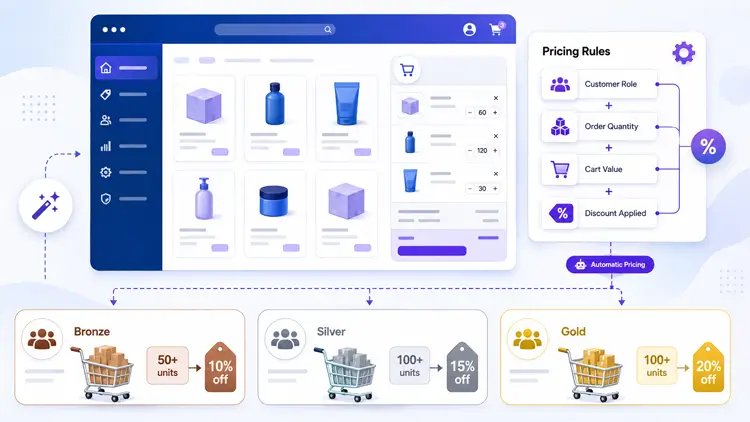
Dynamic wholesale discounts in WooCommerce are price adjustments that change automatically based on conditions you define, not fixed, one-size-fits-all prices.
Instead of manually creating a coupon for every buyer or every sale, you set rules once. WooCommerce then applies the right price at checkout, every time, based on:
- Customer role (wholesale, VIP, retail)
- Order quantity or cart total
- Product or category
- Shipping location
- Purchase history
This is different from a standard WooCommerce coupon, which is static and usually applies the same discount to everyone who enters the code. Dynamic wholesale discounts react to real-time cart and customer data, which is exactly what B2B buyers expect from a modern wholesale storefront.
Why Static Discounts Don’t Work for B2B
Wholesale buyers rarely fit into one pricing bucket. A distributor ordering 500 units shouldn’t pay the same price as one ordering 50. A returning customer with a net-30 account shouldn’t see the same storefront price as a first-time guest.
If you’re still managing this with manual price lists, spreadsheets, or one-off coupon codes, you’re spending hours on something that should run itself. That manual overhead is the single biggest reason growth-stage WooCommerce stores move to dynamic wholesale discounts in WooCommerce instead of static pricing.
How Dynamic Pricing Works in WooCommerce
At a technical level, dynamic pricing plugins hook into WooCommerce’s cart and checkout process. They evaluate a set of conditions every time a cart updates, then apply a price modifier – a discount, fee, or free item, if those conditions are met.
Most dynamic pricing tools for WooCommerce, including Whols, let you build rules around three core elements:
- Action: What happens (a cart discount, additional fee, or BOGO offer)
- Product condition: Which products or categories qualify
- Customer condition: Who the rule applies to (guest, registered user, wholesale role, or specific customers)
You can also stack “common conditions” like minimum cart subtotal, item quantity, or shipping country on top of those rules. This is what makes dynamic pricing genuinely different from a basic coupon: you can combine multiple layers of logic into a single rule, and WooCommerce evaluates it automatically at checkout.
Example Rule Set
Here’s a realistic setup for a mid-size wholesale store selling home goods:
| Rule | Condition | Discount |
|---|---|---|
| Bronze tier | B2B role, cart under $1,000 | 10% off cart |
| Silver tier | B2B role, cart $1,000–$2,999 | 15% off cart |
| Gold tier | B2B role, cart $3,000+ | 20% off cart |
| Bulk SKU discount | Any customer, 50+ units of one product | 8% off that product |
| New account incentive | First order, B2B role | Free shipping fee waiver |
Each row runs independently and automatically. No one on your team needs to apply a code or adjust a price manually.
How to Set Up Dynamic Wholesale Discounts in WooCommerce with Whols
Whols provides wholesale pricing and customer-role functionality for WooCommerce, while Whols Pro’s Dynamic Rules feature automates conditional cart discounts, fees, BOGO promotions, free shipping, and payment-method rules. It’s the core engine behind rule-based wholesale pricing in the plugin, and it’s a Pro-tier feature — not part of the free version. Here’s how the setup works in practice.
Step 1: Activate Dynamic Rules
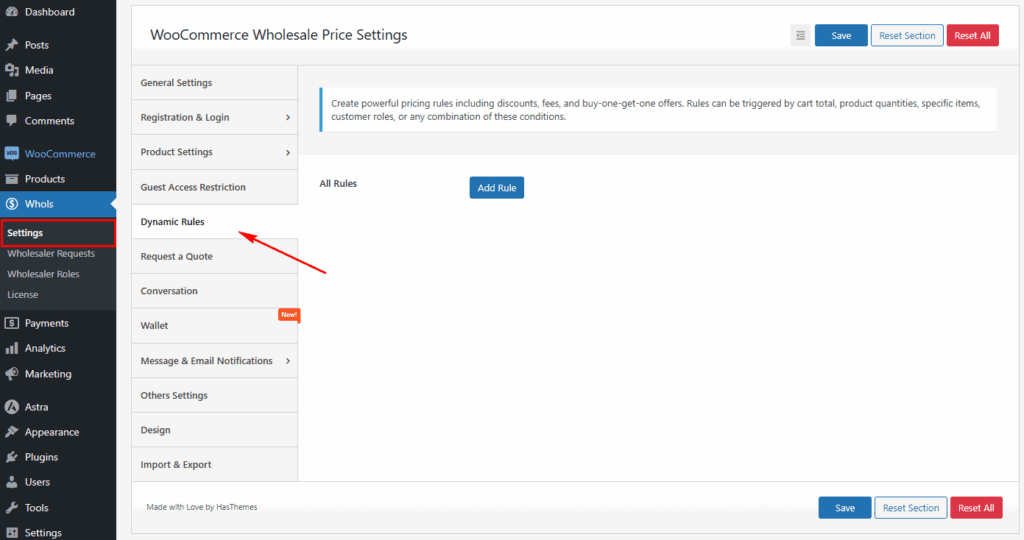
Go to WordPress Dashboard > Whols > Settings > Dynamic Rules. This is where all your pricing rules live in one place, so you’re not hunting across multiple plugin screens to manage pricing logic.
Step 2: Choose Your Action
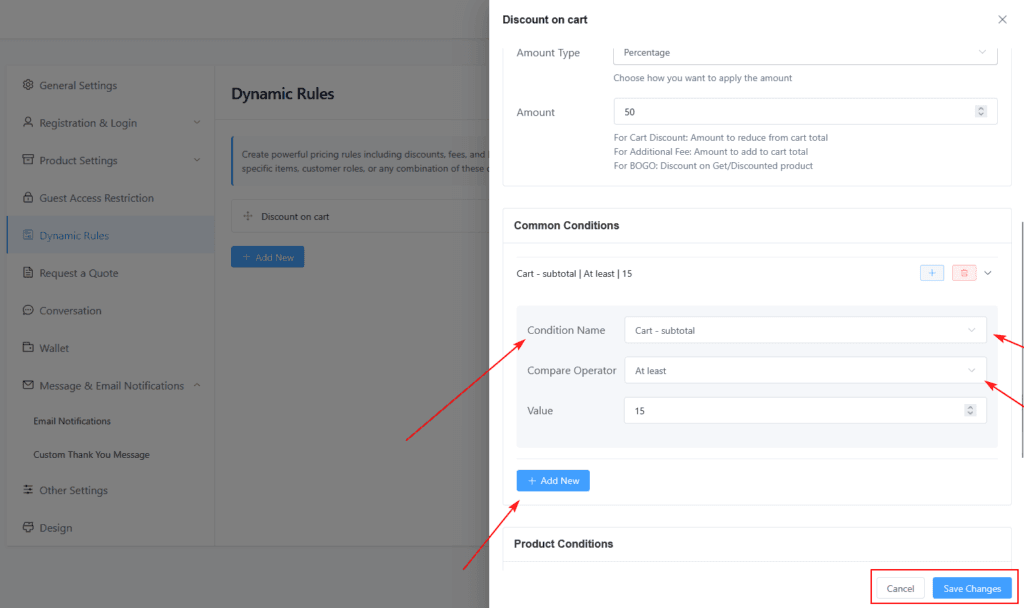
Click Add Rule, then pick what the rule should do:
- Cart Discount — percentage or fixed amount off the whole cart
- Additional Fee — for things like international handling or rush processing
- BOGO Offer — buy-one-get-one, on the same or a different product
- Free Shipping — waive shipping costs when conditions are met
- Payment Method Rule — restrict or enable specific payment gateways by condition
Step 3: Set Product Conditions
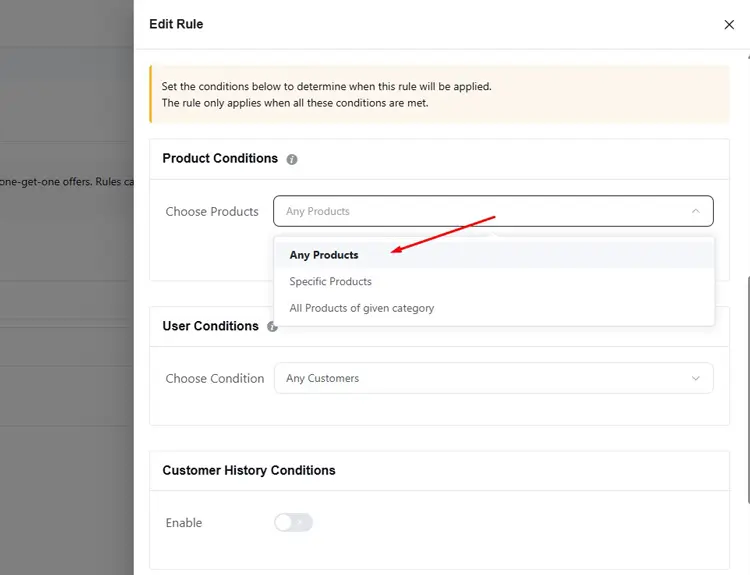
Decide which products trigger the rule: any product, specific products, or an entire category. You can also choose whether the rule needs any, all, or none of the selected products in the cart.
Step 4: Set Customer Conditions
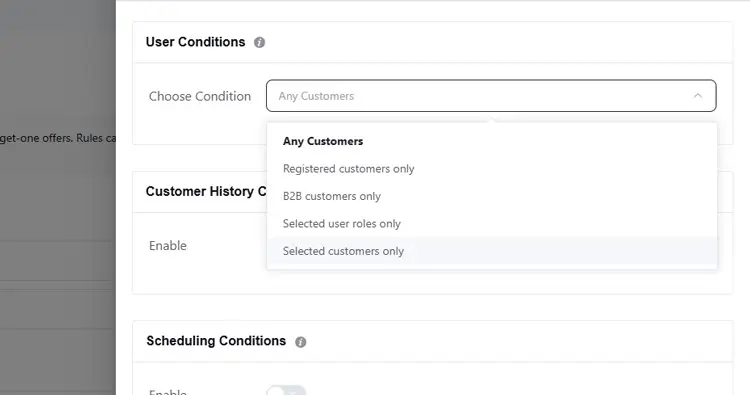
This is where wholesale logic gets specific. You can target:
- All customers
- Registered customers only
- B2B customers only
- Selected user roles (Gold, Silver, Bronze, or custom roles you’ve created)
- A hand-picked list of individual customers
Step 5: Add Common Conditions
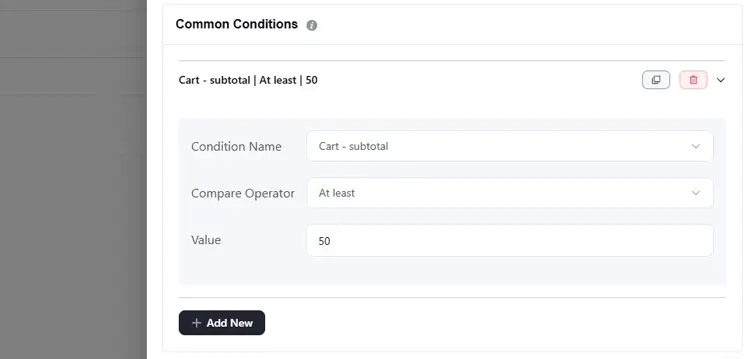
Layer in extra requirements — minimum cart subtotal, total quantity, unique item count, or shipping country — using “at least,” “less than,” or “exactly equals” comparisons. You can also schedule rules to run only during specific date ranges, which is useful for time-limited wholesale promotions.
Step 6: Save and Test
Save the rule, then place a test order using a wholesale test account to confirm pricing applies correctly before it goes live for real customers. Whols also includes a built-in Rules Inspector, which lets you review every active rule in one place — helpful once you’re running more than a handful of rules at once.
This structure means you can build tiered pricing, volume discounts, and role-based deals without writing a single line of code. For teams managing multiple pricing tiers, Whols’ pricing plans outline which tier includes Dynamic Rules and other advanced features.
Combining Whols with Pricing Automation Tools
A dynamic pricing plugin handles what happens inside WooCommerce. But growth-stage wholesale businesses usually need pricing decisions to inform systems outside WooCommerce too — your CRM, email platform, ERP, or accounting software. That’s where automation tools come in.
Why Add Automation on Top of Dynamic Pricing?
Dynamic Rules in Whols already automates the pricing decision itself. Automation tools extend that by automating everything that should happen because of a pricing event:
- Notify your sales team when a Gold-tier customer places a large order
- Sync a customer’s new pricing tier to your CRM after they hit a spending threshold
- Trigger a follow-up email when someone qualifies for a bulk discount but doesn’t check out
- Push order and pricing data into accounting software without manual entry
- Update customer segments in your email tool based on order history
None of this changes the price shown at checkout. It changes what your business does in response to that pricing event — which matters a lot once you’re managing dozens or hundreds of wholesale accounts.
Practical Workflow Example
Here’s a realistic setup that pairs dynamic wholesale discounts in WooCommerce with WooCommerce’s own Zapier integration. Note that this connects WooCommerce order data to Zapier — it isn’t a direct Whols-to-Zapier integration, since Whols applies the pricing rule inside WooCommerce first:
- A B2B customer places an order that triggers your Gold-tier 20% cart discount rule in Whols.
- WooCommerce records the order, including the discounted total and the customer’s role, and sends that order data to Zapier via the Order paid trigger. The official Zapier Integration for WooCommerce supports over 70 triggers and 25 actions across order, product, and customer data (WooCommerce.com, 2026).
- Zapier reads the order total and customer role from the order data.
- A Filter by Zapier step checks if the order qualifies as a high-value wholesale order.
- If it does, Zapier creates a task in your CRM, notifies your account manager in Slack, and logs the order in a Google Sheet for reporting.
This workflow doesn’t touch pricing logic at all — Whols already handled that inside WooCommerce. Zapier only reacts to the order after the discount has been applied, automating the business response rather than the pricing decision itself.
Where to Draw the Line Between Plugin and Automation Tool
| Task | Handle in Whols | Handle in Automation Tool |
|---|---|---|
| Applying role-based discounts | ✅ | — |
| Quantity or cart-value price breaks | ✅ | — |
| BOGO or product-specific promotions | ✅ | — |
| Notifying sales team of large orders | — | ✅ |
| Syncing customer tier to CRM | — | ✅ |
| Sending abandoned cart emails for bulk buyers | — | ✅ |
| Updating accounting software with order data | — | ✅ |
| Restricting pricing by shipping country | ✅ | — |
Keeping pricing logic inside a dedicated plugin and business-process automation inside a tool like Zapier avoids duplicate logic and keeps troubleshooting simpler when something doesn’t apply correctly.
Common Mistakes to Avoid
- Building conflicting rules. If two rules qualify for the same cart with different discount amounts, decide upfront whether they should stack or whether only the highest-priority rule should apply. Use the Rules Inspector to check for overlaps before launch.
- Skipping the test order step. Always place a real test order with a wholesale test account before rules go live. A misconfigured condition can silently apply the wrong price to real customers.
- Automating before the pricing logic is stable. Set up and confirm your dynamic wholesale discounts in WooCommerce first. Layer automation on top once pricing behavior is predictable — automating a broken rule just breaks things faster.
- Ignoring guest and first-time buyers. Many wholesale stores only build rules for approved B2B accounts and forget to define what happens for pending or guest wholesale applicants.
- Not documenting rule logic. As rule counts grow, use a private note or naming convention to record why each rule exists. This saves time when someone else on your team needs to audit pricing later.
Why This Matters for Growing WooCommerce Stores
WooCommerce still powers a significant share of the global ecommerce market. W3Techs reports that WooCommerce is used by roughly 48% of all ecommerce sites with a known platform as of 2026, while StoreLeads has tracked more than 4 million active WooCommerce stores globally (W3Techs, 2026). That scale means a large number of B2B sellers are running wholesale operations on WooCommerce, often without pricing tools built for how B2B buying actually works.
As your wholesale customer base grows past a handful of accounts, spreadsheet-based pricing and manual coupon management stop scaling. Dynamic wholesale discounts in WooCommerce remove that bottleneck on the storefront side.
Automation tools remove it on the operations side. Together, they let a small team manage pricing complexity that would otherwise need a dedicated ops hire.
Frequently Asked Questions
What is the difference between dynamic pricing and a WooCommerce coupon?
A coupon applies a fixed, one-time discount when a customer manually enters a code. Dynamic wholesale discounts in WooCommerce apply automatically based on rules like customer role, cart total, or product quantity – no code required, and you can combine multiple conditions at once.
Do I need a separate plugin for wholesale pricing and dynamic pricing?
No. Plugins like Whols combine wholesale role management and dynamic pricing rules in one system, so you don’t need to run two separate tools that might conflict with each other’s pricing logic. Just confirm which plan tier includes the Dynamic Rules feature, since it’s a Pro-level capability.
Can I offer different discounts to different wholesale tiers?
Yes. You can create custom user roles (like Gold, Silver, and Bronze) and set separate discount rules for each one, including different percentages, minimum order requirements, or eligible product categories.
Will dynamic pricing slow down my WooCommerce store?
Well-built dynamic pricing plugins evaluate rules efficiently at the cart and checkout stage, so the impact on load time is minimal for most stores. Performance issues are more likely to come from having an excessive number of overlapping rules than from the feature itself.
What automation tools work best with WooCommerce wholesale pricing?
Zapier is the most widely used option because of its official WooCommerce integration, supporting 70+ triggers and 25+ actions across orders, products, and customers. Native webhooks, Make (formerly Integromat), and direct CRM integrations are also common choices depending on your existing tech stack.
Can I set minimum order quantities alongside dynamic discounts?
Yes. Most wholesale pricing plugins, including Whols, let you combine minimum order quantity rules with dynamic wholesale discounts in WooCommerce. For example, requiring a 50-unit minimum before a bulk discount rule activates.
How do I test dynamic pricing rules before launch?
Create a test wholesale account matching the role you’re targeting, add qualifying products to the cart, and confirm the discount applies correctly at checkout. Test edge cases too, like carts that almost meet the minimum threshold, and use the Rules Inspector to confirm no other rule is silently overriding it.
Conclusion
Dynamic wholesale discounts in WooCommerce turn pricing from a manual, error-prone task into a system that runs itself. Start with a dedicated plugin like Whols to handle the pricing logic — role-based tiers, quantity breaks, and cart-level rules through its Pro Dynamic Rules feature. Then layer automation tools on top to connect those pricing events to the rest of your business, from CRM updates to sales alerts.
Get the pricing rules right first. Automation works best once the foundation underneath it is solid.
If you’re ready to move past manual coupon codes and spreadsheet pricing, explore Whols’ wholesale pricing features to see which plan includes Dynamic Rules for your store.