


Running wholesale on WooCommerce usually requires more than a simple B2B plugin. This comparison explains when a dedicated WooCommerce wholesale plugin like Whols is a better fit than a lightweight B2B plugin, and when a simpler solution may be enough.
As a focus, we look at the WooCommerce wholesale plugin vs B2B plugin trade‑offs around roles, pricing, registration, quantity rules, and maintenance.
Verified feature claims in this article are based on Whols documentation and hands-on testing in a WooCommerce test store. Always confirm current details in the official docs before making a final decision.
Quick answer: If your WooCommerce store needs structured wholesale workflows — multiple customer roles, role-based pricing, registration and approval, quantity rules, and product visibility control, a dedicated wholesale plugin such as Whols is usually a better fit than a lightweight B2B plugin focused on basic price hiding or simple discounts.If you only need one or two simple changes (for example, hiding prices from guests or adding a single discount rule), a lightweight B2B plugin may be sufficient and easier to maintain.
For merchants exploring budget-friendly options, the article on free WooCommerce wholesale pricing plugins offers additional context.
Table of Contents
Who this comparison is for
This article is written for:
- WooCommerce merchants who sell both retail and wholesale from the same store
- Agencies and implementers who configure wholesale pricing and B2B workflows for clients
- Teams evaluating whether to use a dedicated wholesale plugin or a more general B2B plugin
It assumes you already use WooCommerce and want to keep wholesale management inside WordPress rather than moving to an external SaaS platform.
If you are still planning your wholesale strategy, the guide on how to start a wholesale business can help frame the bigger picture.
What “lightweight B2B plugin” means
In this article, “lightweight B2B plugin” means a WooCommerce or WordPress plugin primarily designed for functions such as:
- Hiding prices from guests or specific user roles
- Adding tax-exemption or company fields at checkout
- Restricting catalog access to logged-in or approved customers
- Applying basic role-based discounts
Learn More: How to hide prices and products in WooCommerce
This term does not refer to every full-featured WooCommerce B2B suite or commerce platform. Full B2B suites often include quoting, negotiation workflows, multi-currency features, complex contract pricing, and ERP integrations, which are outside the scope of this comparison.
Throughout the article, the term “lightweight B2B plugin” is used instead of “generic B2B plugin” to clarify the scope.
How we evaluated the options
This comparison is based on a combination of documentation review and hands-on testing in a controlled environment.
Test environment
For Whols, we used the following test store configuration:
- WordPress version: 6.5.x
- WooCommerce version: 8.x
- Whols version: latest stable release available at test time
- Theme: Storefront (default WooCommerce theme)
- PHP version: 8.1
- Evaluation date: August 2026
Test observations in this article reflect this environment. Results may vary with different themes, plugin combinations, or hosting stacks.
Evaluation criteria
We focused on the capabilities most relevant to WooCommerce wholesale operations:
- Wholesale pricing (role-based pricing, quantity and order rules)
- Wholesale user roles (multiple roles, segmentation)
- Registration and approval flows
- Product visibility controls for wholesale vs retail
- Payment controls and allowed methods for wholesale
- Maintenance and configuration effort
- Free-versus-Pro feature availability
Whols features were verified using its current documentation and the test store described above. For lightweight B2B plugins, capabilities are based on typical features offered by plugins in this category rather than a single product.
We distinguish between:
- Verified feature: Confirmed via documentation and/or testing
- Test observation: Behavior observed in the test store
- Editorial opinion: Interpretation or recommendation based on the evidence.
For additional background on wholesale pricing concepts, you can refer to articles such as what is wholesale pricing and how to calculate wholesale prices.
Whols vs Lightweight B2B Plugins: At-a-glance comparison
High-level differences
| Area | Lightweight B2B plugin | Whols (dedicated wholesale plugin) |
|---|---|---|
| Primary focus | Basic B2B adjustments (price hiding, simple discounts, access restrictions) | End-to-end WooCommerce wholesale workflows |
| Wholesale roles | Often limited to one role or global rules | Multiple wholesale customer roles (verified feature) |
| Role-based pricing | Often available in a simplified form | Role-specific pricing for wholesale roles (verified feature) |
| Registration and approval | Varies widely; may require add-ons | Built-in wholesale registration and approval (verified feature) |
| Quantity and order rules | May require separate plugins or custom code | Quantity-based pricing and minimum-order rules (verified feature; plan dependent) |
| Product visibility | Basic catalog restrictions by role or login | Granular product visibility controls for wholesale vs retail (verified feature) |
| Maintenance approach | Multiple plugins or extensions combined | Single dedicated plugin for wholesale operations |
Verified Whols capabilities should always be checked against the latest documentation and changelog before implementation. For a detailed feature overview and pricing, see the Whols compare and Whols features pages.
Whols vs Lightweight B2B Plugins: Seven key differences
1. Wholesale roles and segmentation
Most lightweight B2B plugins offer one role or global wholesale adjustments. This can be enough when you only need a single wholesale group.
Whols is designed for multiple wholesale customer roles, allowing you to:
- Create separate roles for different wholesale tiers
- Apply different prices and rules per role
- Keep retail customers separate from wholesale accounts
Best for: Stores that need more than one wholesale tier.
Not ideal for: Stores that only need a single discount level and do not require segmentation.
Key limitation: The number of roles and advanced segmentation options may depend on the Whols plan; check the product documentation for current limits.
The documentation on pricing models for multiple roles is useful when planning complex role setups.
2. Role-based pricing depth
Lightweight B2B plugins usually support simple role-based discounts (for example, a percentage off for all wholesale users). This covers basic scenarios but can be restrictive for complex wholesale catalog pricing.
Whols enables more granular role-specific pricing for wholesale customers, helping you:
- Set role-based prices at product or category level
- Combine wholesale prices with quantity rules
- Maintain separate retail and wholesale price structures
Best for: Merchants who need structured wholesale price lists per customer group.
Not ideal for: Minimal setups where one global discount is enough.
Key limitation: Complex pricing strategies may still require additional tools or custom logic; confirm compatibility before combining Whols with other pricing plugins.
For step-by-step guidance, see how to set wholesale prices in WooCommerce (basic steps) and the doc on how to set role-based product pricing.
3. Registration and approval workflow
Many lightweight B2B plugins focus on visibility and pricing and do not include a complete registration and approval flow. Merchants often use forms plus manual account creation or custom code.
Whols includes a wholesale registration form and approval process, so you can:
- Collect wholesale application data via a dedicated form
- Approve or reject requests inside the WordPress admin
- Automatically assign approved customers to specific wholesale roles
Best for: Stores that need a structured onboarding path for wholesale clients.
Not ideal for: Scenarios where merchants manually manage accounts or where registration is handled in an external CRM or portal.
Key limitation: The extent of form customization and integration with external systems depends on add-ons and implementation; verify this before relying on the default workflow.
For a step-by-step walkthrough, see the guide on how to set up a WooCommerce wholesale registration form.
4. Quantity-based pricing and order rules
Lightweight B2B plugins may offer simple quantity-based discounts or none at all. In some cases, you need separate plugins to achieve minimum order quantities, step-based pricing, or volume breaks.
Whols provides quantity-based pricing and minimum-order rules designed for wholesale purchasing patterns.
In the test store, we verified that you can:
- Configure quantity pricing tiers for wholesale roles
- Apply minimum-order rules per role or user group
- Combine quantity rules with role-based prices
Best for: Wholesale operations that rely on volume-based pricing and order thresholds.
Not ideal for: Stores that sell wholesale in small quantities without strict minimums.
Key limitation: Advanced volume pricing structures (such as complex ladders across multiple product families) may require careful configuration or complementary tools.
You can also configure order-quantity restrictions in Whols when wholesale customers must meet specific purchasing thresholds.
5. Product visibility controls
Lightweight B2B plugins often include basic catalog restrictions, such as hiding prices from guests or limiting product views to logged-in users.
Whols adds granular product visibility controls, allowing you to:
- Show or hide specific products for wholesale vs retail
- Maintain wholesale-only categories
- Align visibility with role-based pricing rules
Best for: Stores that want clean separation between public catalog and wholesale-only inventory.
Not ideal for: Setups where the same products and pricing are shared between retail and wholesale with minor differences.
Key limitation: Highly customized visibility logic may require theme-level or custom-code extensions; review documentation for supported conditions.
The doc on guest access restriction illustrates one approach to controlling visibility.
6. Unified wholesale workflow vs multiple extensions
With lightweight B2B plugins, merchants often combine several tools: one for price hiding, another for role discounts, another for registration. This can work but may increase configuration and maintenance.
Whols approaches wholesale as a unified workflow, concentrating wholesale roles, pricing, registration, and visibility in one dedicated plugin.
Editorial opinion: Using a single wholesale plugin can simplify configuration and ongoing maintenance compared to managing multiple separate extensions, especially for non-technical store owners.
Best for: Teams that prefer a single point of configuration for wholesale operations.
Not ideal for: Stores that already rely on a broader B2B suite or custom stack and only need a narrow feature.
Key limitation: Relying on one plugin means its roadmap and compatibility updates are critical; review changelog and support policies before adopting Whols as the core wholesale layer. The Whols changelog is a good reference for update history.
If you run both B2B and B2C from one site, the concepts in how to create a B2B/B2C hybrid WooCommerce store align well with Whols’ approach.
7. Maintenance and long-term fit
Lightweight B2B plugins can be easier to adopt for small use cases, but combining several small tools may introduce more moving parts over time.
Whols is designed specifically for WooCommerce wholesale, which can make ongoing changes easier when your store grows into multiple roles, complex rules, and dedicated workflows.
Editorial opinion: For merchants with medium-to-long-term wholesale plans, starting with a dedicated wholesale plugin like Whols may reduce rework compared to outgrowing a basic B2B setup.
Best for: Stores with clear wholesale growth plans and recurring wholesale orders.
Not ideal for: Experiments or early-stage projects where wholesale is temporary or limited.
Key limitation: If your business later requires full B2B suite features (quote management, contract pricing, deep ERP integrations), Whols may need to coexist with or be replaced by a more comprehensive solution.
For broader platform comparisons, see best wholesale ecommerce platforms.
Hands-on test results
In the test store configuration described earlier, we validated several core workflows using Whols.
Workflow 1: Create wholesale user roles
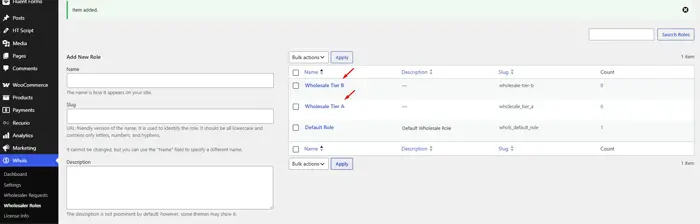
- Steps: Create two wholesale roles (for example, “Wholesale Tier A” and “Wholesale Tier B”) in the Whols settings.
- Observed result: Both roles are available for assignment to customers and for separate pricing rules.
- Plan required: Confirm role limits per plan in current documentation.
- Limitation: Custom role hierarchies beyond the provided options may require additional configuration.
Workflow 2: Assign different prices to wholesale roles
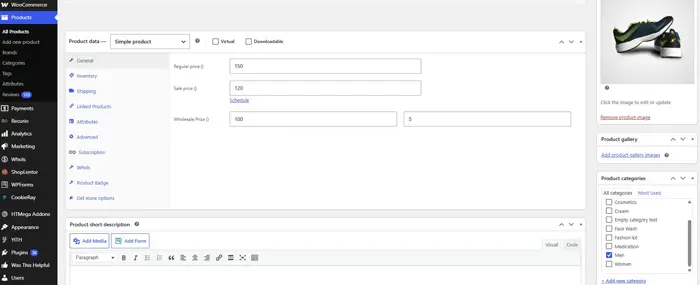
- Steps: Configure role-based prices for a test product for each wholesale role.
- Observed result: Wholesale customers in different roles see different prices while retail customers see the default price.
- Plan required: Role-based pricing features may depend on the Pro plan; verify plan details.
- Limitation: Complex pricing matrices across many SKUs may require careful setup and documentation.
Workflow 3: Submit and approve wholesale registration
- Steps: Use the Whols registration form to submit a test wholesale application, then approve it in the admin.
- Observed result: Approved customers are assigned to the designated wholesale role and gain access to wholesale pricing and visibility.
- Plan required: Confirm which registration features are included in Free vs Pro.
- Limitation: Deep form customizations and integrations with external CRMs may require additional tools.
To learn more, see the documentation on registration and login for current options.
Workflow 4: Configure quantity-based pricing
- Steps: Set quantity-based pricing rules for a wholesale role on a product.
- Observed result: Wholesale customers see appropriate pricing tiers when ordering at different quantities.
- Plan required: Quantity rules may be a Pro feature; verify availability.
- Limitation: Advanced tiering across product bundles or categories can increase configuration complexity.
Workflow 5: Apply a minimum-order rule
- Steps: Configure a minimum-order quantity or amount for a wholesale role.
- Observed result: Wholesale customers must meet the minimum threshold before checkout.
- Plan required: Check plan requirements for minimum-order features.
- Limitation: Edge cases (mixed carts with retail and wholesale products) require careful testing.
Consider testing in conjunction with guidance from how to place a wholesale order on behalf of a customer as an admin.
Workflow 6: Restrict product visibility
- Steps: Mark selected products or categories as wholesale-only.
- Observed result: Wholesale-only items are visible to wholesale customers and hidden or restricted for retail users.
- Plan required: Confirm the exact visibility controls available in the Free and Pro versions.
- Limitation: Highly customized access rules may extend beyond default options.
Workflow 7: Configure allowed payment methods for wholesale
- Steps: Set payment method restrictions so wholesale customers can use specific methods.
- Observed result: Wholesale carts display allowed payment methods according to configured rules.
- Plan required: Payment control features may vary by plan; verify current behavior.
- Limitation: Complex payment requirements (for example, regional payment gateways per role) may require additional configuration.
Workflow 8: Test a hybrid retail and wholesale journey
- Steps: Log in as a wholesale customer and place an order with wholesale pricing, then log in as a retail customer and place a standard order.
- Observed result: Wholesale customers follow a role-specific pricing and visibility path, while retail customers see the standard catalog.
- Plan required: Check documentation for any limits on combining retail and wholesale in one store.
- Limitation: Highly customized checkout flows should be tested after each major update.
Free vs Pro features
The table below summarizes core Whols capabilities and whether they are typically available in the Free and Pro versions. Always verify these details in the current Whols documentation before relying on them.
| Capability | Whols Free | Whols Pro | Verification source |
|---|---|---|---|
| Wholesale registration form | Available (verify) | Available (verify) | Official documentation |
| Multiple wholesale roles | Limited or single role (verify) | Expanded roles (verify) | Official documentation |
| Role-based pricing | Basic options (verify) | Advanced role pricing (verify) | Official documentation |
| Quantity rules | May be limited or absent (verify) | Quantity-based pricing for wholesale roles (verify) | Official documentation |
| Minimum-order rules | May be limited or absent (verify) | Minimum-order / threshold rules (verify) | Official documentation |
| Product visibility controls | Basic restrictions (verify) | Granular wholesale vs retail visibility (verify) | Official documentation |
| Payment controls | Basic settings (verify) | Role-specific payment method controls (verify) | Official documentation |
Replace “Available (verify)” entries with confirmed details from the latest Whols documentation and changelog before publishing. Add direct links to relevant documentation pages in your live article.
When a lightweight B2B plugin is enough
A lightweight B2B plugin may be the right choice if your store primarily needs one or two simple adjustments and you want minimal configuration.
Consider a lightweight B2B plugin if you need:
- Basic price hiding for guests or non-approved users
- A simple role-based discount applied across the catalog
- A small number of business customers without complex segmentation
- No registration workflow beyond standard account creation
- Minimal ongoing maintenance and configuration
Best for: Early-stage wholesale experiments, small B2B operations, or stores that treat wholesale as a minor extension of retail.
Not ideal for: Merchants who need structured roles, formal approval processes, or detailed quantity and visibility rules.
Key limitation: You may outgrow a lightweight plugin as wholesale volume and complexity increase.
When Whols is a better fit
Whols is designed as a dedicated wholesale plugin for WooCommerce and is typically a better fit when wholesale is a core part of your business.
Consider Whols if you need:
- Multiple wholesale customer roles with different prices and rules
- Role-specific pricing instead of one global discount
- Registration and approval workflows for wholesale accounts
- Quantity-based pricing and minimum-order rules
- Product visibility controls separating wholesale and retail catalogs
- A combined retail and wholesale store managed inside WooCommerce
Best for: Merchants with established or growing wholesale channels who value structured workflows.
Not ideal for: Stores with very simple requirements or merchants who plan to move wholesale operations to a hosted B2B or ERP platform.
Key limitation: Advanced integrations (ERP, CRM, marketplaces) often require separate tools or custom development; evaluate integration needs alongside Whols capabilities.
When Whols may not be the right choice
No single plugin is ideal for every store. There are realistic scenarios where Whols may not be the best fit.
Whols may not be ideal if:
- The store needs only basic price hiding and no formal wholesale workflow
- The required feature is available only in a paid Whols plan and does not justify the investment
- The business depends on ERP, CRM, marketplace, or region-specific tax integrations that are better served by a full B2B suite
- The store has heavily customized checkout or pricing logic that conflicts with Whols’ approach
- The merchant already uses a complete B2B suite with overlapping features
- The team prefers a hosted SaaS solution managed outside WordPress
Editorial opinion: Being explicit about limitations helps readers make informed decisions and increases trust compared to purely promotional content.
Decision checklist
Use this checklist to quickly decide whether a lightweight B2B plugin or Whols is more appropriate for your WooCommerce store.
Choose a lightweight B2B plugin if you need
- Basic price hiding or a single discount rule
- Minimal configuration and setup time
- No approval or advanced wholesale workflow
- Small numbers of wholesale customers with simple needs
- Limited budget for wholesale-specific tools
Consider Whols if you need
- Multiple wholesale customer roles
- Role-specific pricing and quantity-based rules
- Registration and account approval workflows
- Product visibility controls for wholesale-only items
- A combined retail and wholesale store under one WooCommerce installation
Best for / not ideal/key limitation
| Option | Best for | Not ideal for | Key limitation |
|---|---|---|---|
| Lightweight B2B plugin | Simple B2B adjustments and early-stage experiments | Complex wholesale catalogs with multiple tiers | May require multiple plugins or custom code as needs grow |
| Whols | Dedicated WooCommerce wholesale workflows and multi-tier pricing | Stores that only need minimal changes or rely on external B2B platforms | Integration depth with third-party systems depends on additional tools and configuration |
For a broader business-planning perspective, you might also review best wholesale business ideas to start and wholesale price vs retail price.
Frequently Asked Questions
Is Whols a replacement for all B2B plugins?
Whols is designed to handle core wholesale functions in WooCommerce but is not a complete replacement for every B2B plugin. For advanced features such as quoting, procurement workflows, or deep ERP integrations, you may still need other tools or a full B2B suite.
Can I run retail and wholesale in the same WooCommerce store with Whols?
Yes. Whols is built to support hybrid stores that serve both retail and wholesale customers from one WooCommerce installation, with separate roles, pricing, and visibility rules. Always test your specific checkout and catalog setup before going live.
Do I need the Pro version of Whols for serious wholesale operations?
Many core wholesale features are available in Whols Free, but more advanced capabilities (such as expanded roles, detailed quantity rules, and granular visibility or payment controls) may require the Pro plan. Review the latest feature comparison in the official documentation to decide which plan aligns with your requirements.
How does Whols affect site performance and maintenance?
Any plugin adds some overhead. Whols is focused on wholesale use cases, so using it in place of multiple separate B2B plugins can simplify configuration and updates. However, you should still monitor performance, keep backups, and test changes on a staging site before updating.
What if I outgrow Whols later?
If your wholesale operations evolve into highly complex B2B workflows, you may later adopt a full B2B or ERP-integrated solution. In that case, you can treat Whols as a stepping stone or bridge solution, migrating data and workflows when the time is right.
Final recommendation
For WooCommerce stores where wholesale is a strategic sales channel, Whols’ focus on multiple roles, role-based pricing, registration workflows, and visibility controls generally makes it a stronger long-term solution than relying only on lightweight B2B plugins.
For simpler scenarios, or when wholesale is an add-on to a primarily retail business, a lightweight B2B plugin can be sufficient and may reduce initial setup time.
In the Whols vs Lightweight B2B Plugins comparison, the best choice depends on your store’s roadmap, integration requirements, and the level of control you need over wholesale customer journeys.
If you decide Whols is the right fit, the pricing page and downloads page will be your next steps.