


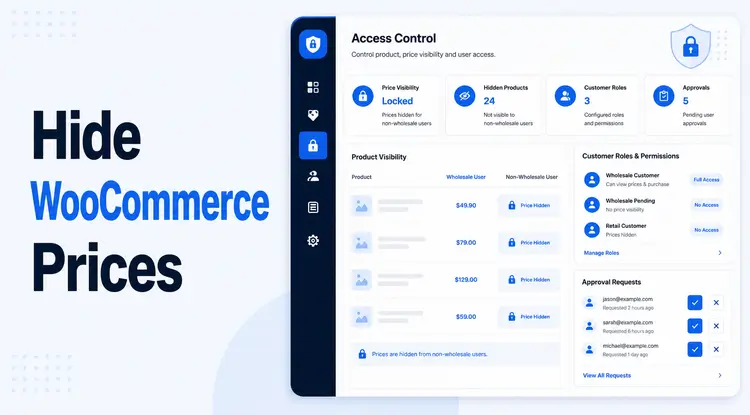
If you run a WooCommerce store that serves both retail shoppers and wholesale buyers, you probably don’t want everyone seeing your wholesale prices or wholesale-only products. The good news: you can hide those prices and products from non-wholesale customers without writing any code, using a B2B wholesale plugin and some smart visibility rules.
Quick answer:
To hide wholesale prices and wholesale-only products from guests and regular customers, use a wholesale/B2B plugin like Whols – B2B WooCommerce Wholesale Solution and configure it to:
- Show wholesale prices only to specific wholesale user roles
- Hide wholesale prices from guests and standard “Customer” accounts
- Hide wholesale-only products or categories from non-wholesale roles
- Gate access through a wholesale registration and approval workflow
- Replace hidden prices with clear “Login to view wholesale prices” or “Wholesale only – apply for access” messages.
This setup lets you protect margins, look professional to B2B buyers, and keep your public storefront clean for regular shoppers.
TL;DR: How to Hide Prices in WooCommerce for Wholesale (no code)
If you just need the high-level playbook, here it is:
1. Install a wholesale plugin that supports role-based pricing and visibility, such as Whols.
2. Create a wholesale user role (or multiple roles) in your store.
3. Set wholesale prices per product or category for that role.
4. Enable “hide wholesale prices” rules so guests and regular customers never see wholesale pricing.
5. Use product visibility settings to mark certain items or categories as “wholesale only” and hide them from retail users.
6. Add a wholesale registration form and manual approval so only verified B2B customers get wholesale access.
7. Show helpful messages where prices are hidden, guiding users to log in or apply for a wholesale account.
We’ll walk through each step using Whols as the main example.
Why Hide Prices and Products from Non-wholesale Customers?
B2B eCommerce is growing fast. Global B2B eCommerce GMV reached an estimated $28.1 trillion in 2024, up 14.8% yearoveryear, and is projected to keep growing steadily in the coming years (Capital One Shopping Research, 2025). At the same time, forecasts suggest B2B eCommerce sales will continue to grow at doubledigit rates in markets like the U.S. (Digital Commerce 360).
As more wholesale buyers move online, protecting your B2B pricing and catalog becomes a strategic necessity.
Common reasons to hide wholesale prices
You may want to hide wholesale pricing from guests and retail shoppers when you:
- Offer deep bulk discounts that only make sense for qualified B2B buyers.
- Have negotiated price tiers with specific partners and don’t want those visible to the public.
- Need to respect minimum advertised pricing (MAP) or similar agreements.
- Want to encourage account creation and capture B2B leads before revealing special pricing.
Hiding wholesale prices keeps your retail channel stable while still rewarding your best B2B customers.
Why also hide wholesale-only products
Sometimes the issue is not just price. You might sell:
- Case packs, pallets, or bulk-only SKUs
- Private-label products for certain retailers
- Items bound by compliance or volume rules
In these cases, you usually want to hide the entire product from non-wholesale users, not just the price. That way:
- Retail customers don’t get confused by bulk-only items.
- Wholesale buyers get a clean, B2B-focused catalog once they log in.
A good wholesale plugin lets you mark products or categories as “wholesale only” and hide them from guests and standard customers.
Approaches to hiding prices in WooCommerce (and why no-code wins)
Before we dive into the Whols workflow, let’s quickly compare your options.
1. Custom code snippets (PHP)
You can hide prices until login with custom code in your theme’s `functions.php` or a snippets plugin. This approach:
- Can hide the price and “Add to Cart” for logged-out users.
- Gives you very granular control if you know PHP.
But the tradeoffs are:
- You need developer-level comfort with WordPress and WooCommerce hooks.
- Updates can break things if snippets are not maintained.
- Handling multiple user roles and complex logic gets messy fast.
For most store owners, this is unnecessary complexity.
2. “Hide price/catalog mode” plugins
There are standalone plugins that:
- Hide prices and/or the cart for guests
- Turn your store into a browse-only catalog
- Or require a login to see any product prices
These are fine for simple private stores, but they often lack:
- Multiple wholesale roles and tiered pricing
- Hybrid B2C + B2B support in one store
- Flexible product-level visibility rules.
3. Full B2B wholesale plugin (recommended)
A dedicated B2B plugin like Whols – WooCommerce Wholesale Prices Plugin is built for exactly this use case:
- Create unlimited wholesale roles
- Set role-based pricing per product, variation, or category
- Hide prices and products based on user role
- Provide wholesale registration and approval
- Add “Request a Quote,” bulk order forms, and minimum quantity rules
In other words, you get a full wholesale layer on top of WooCommerce, without touching code.
Hide Wholesale Prices and Products with Whols (no code): Step-by-step
In this example, we’ll configure your store so that:
- Guests and retail customers see only retail products and retail prices
- Approved wholesale users see wholesale pricing and wholesale-only products
- The whols setup is managed from the dashboard using Whols.
Note: Menu labels can change slightly between versions. Always cross-check with the latest Whols docs.
Step 1: Install and activate Whols
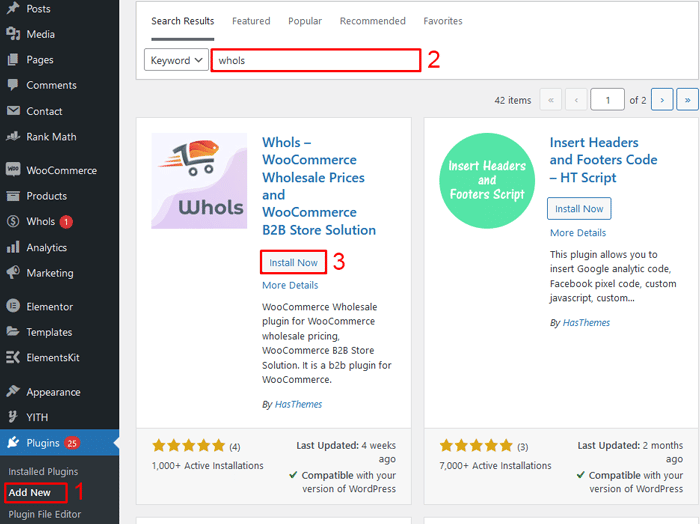
1. From your WordPress admin, go to Plugins → Add New.
2. Search for “Whols – WooCommerce Wholesale Prices Plugin” and click Install → Activate (or upload the premium version if you have it).
3. Confirm WooCommerce is active and meets the basic system requirements.
You can learn more about Whols’ capabilities on the main plugin page: Whols – WooCommerce Wholesale Prices Plugin.
Step 2: Configure wholesale user roles
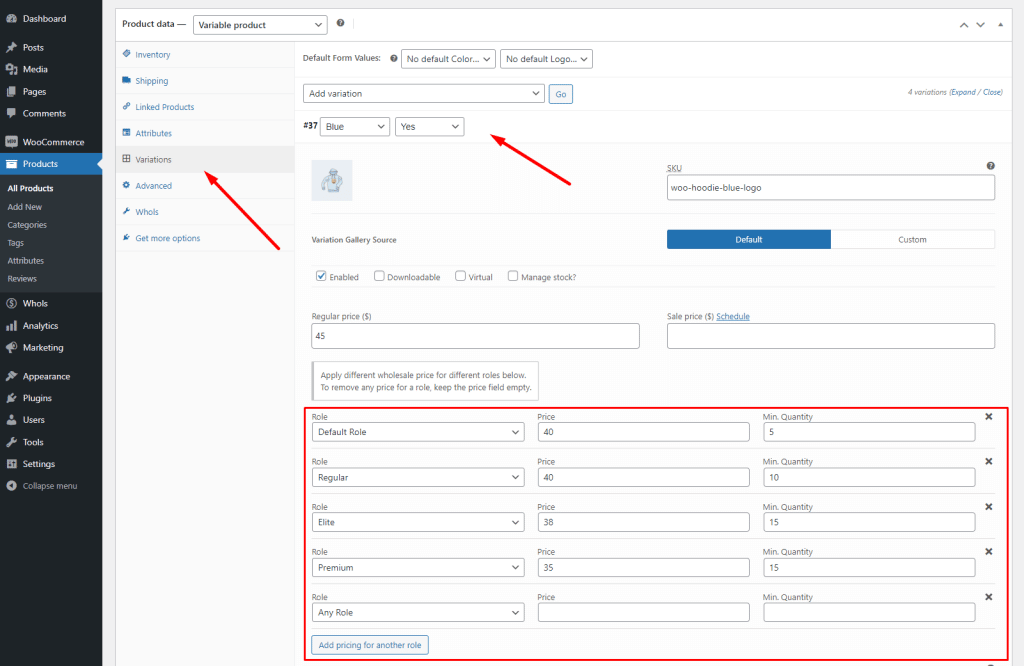
Next, define who counts as “wholesale.”
With Whols, you can:
- Create a “Wholesale Customer” role or multiple tiers (e.g., Silver, Gold).
- Set a default wholesaler role to assign when a registration is approved.
- Control payment and shipping methods for specific roles.
Role-based control is the foundation for hiding or showing the right prices.
If you want a deeper dive into building out your wholesale program first, you can read: How to Grow Wholesale Business (6 Unique Strategies)
Step 3: Set wholesale prices per product (or in bulk)
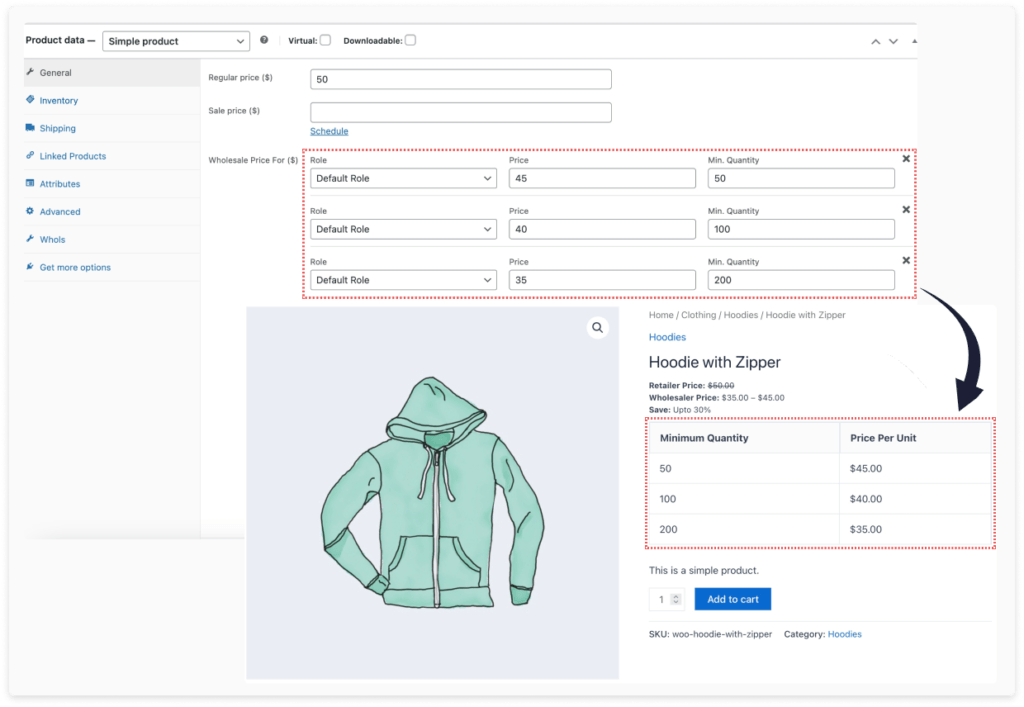
Now, assign wholesale prices.
Whols lets you:
- Add special wholesale prices to each product or variation on the product edit screen
- Set percentage-based discounts from retail prices for specific roles
- Create dynamic pricing rules (e.g., better discounts at higher quantities or for higher-tier wholesale roles)
This is where you implement the pricing strategy that makes sense for your margins and volumes.
If you want help choosing a pricing model, the Whols team also covers strategies here: Best Pricing Strategies for Wholesalers.
Step 4: Hide wholesale prices from regular customers
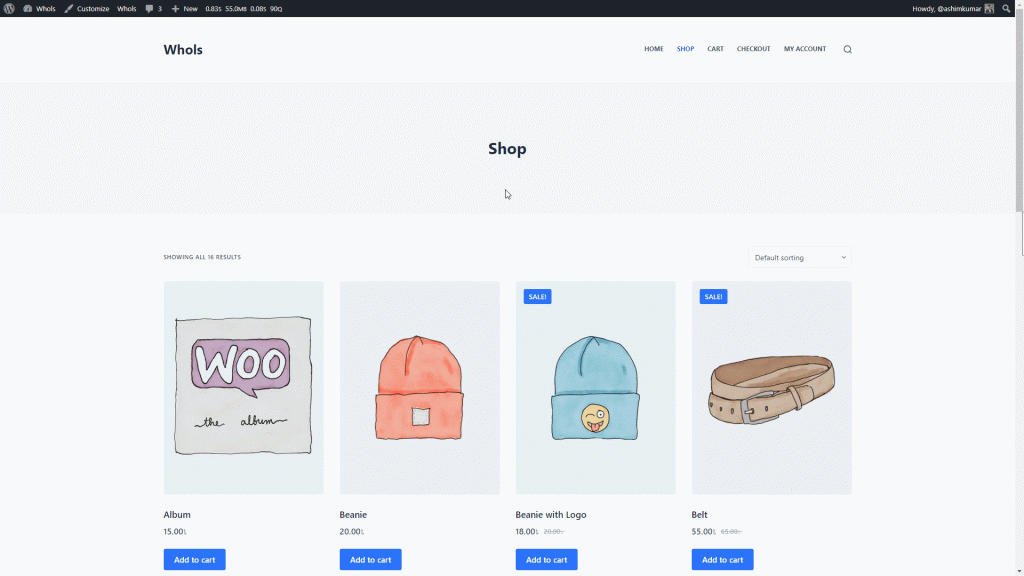
Now it’s time to actually hide those prices from non-wholesale users.
In Whols’ settings (and similar B2B plugins), you’ll typically find options like:
- “Show wholesale prices only to wholesale roles”.
- “Hide wholesale prices from regular customers”.
- “Hide original (retail) prices from wholesale customers”.
The usual setup is:
- Guests and regular “Customer” roles never see wholesale pricing.
- Only logged-in users with one of your wholesale roles see wholesale prices.
- Optionally, wholesale users see only wholesale prices, not retail prices, to avoid confusion.
Once this is configured, your store can show different prices based on who’s logged in—no snippets required.
Step 5: Hide wholesale-only products from non-wholesale customers
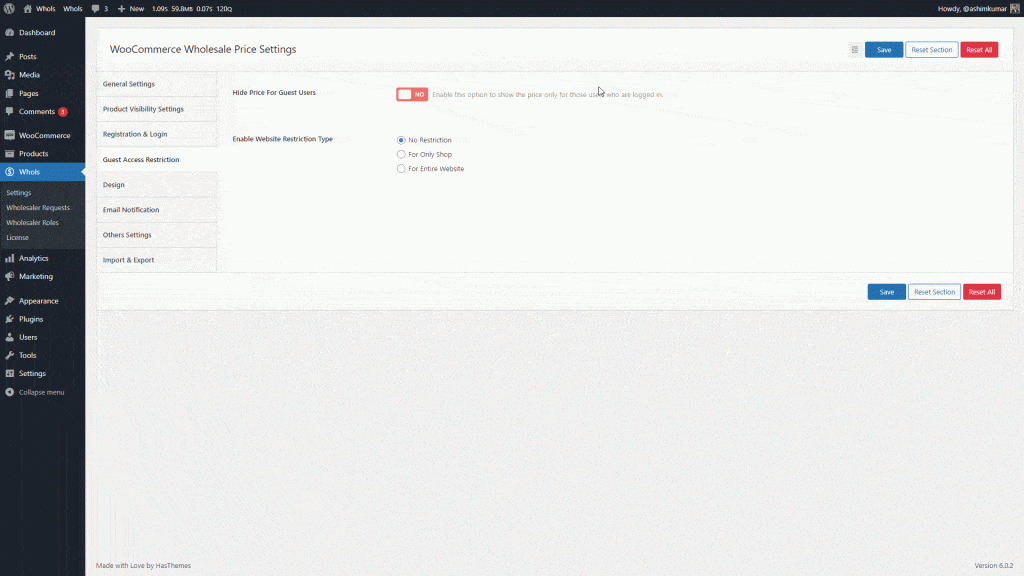
To fully separate your catalogs, use product visibility settings.
Whols includes product visibility rules so you can:
- Mark specific products or categories as “Wholesale only.”
- Hide those products from guests and regular customers
- Optionally hide certain retail-only products from wholesale users
A common pattern:
- Create a “Wholesale Only” category (case packs, pallets, B2B exclusives).
- In Whols’ product visibility settings, set this category to be visible only for your wholesale roles.
- Keep your standard categories visible to everyone.
This way, a retail shopper never even sees the bulk-only SKUs, while wholesalers get a curated B2B catalog after login.
For more on product visibility, see the Whols docs: Product Visibility Settings – Whole.
Step 6: Add a Wholesale Registration Form and Approval Flow
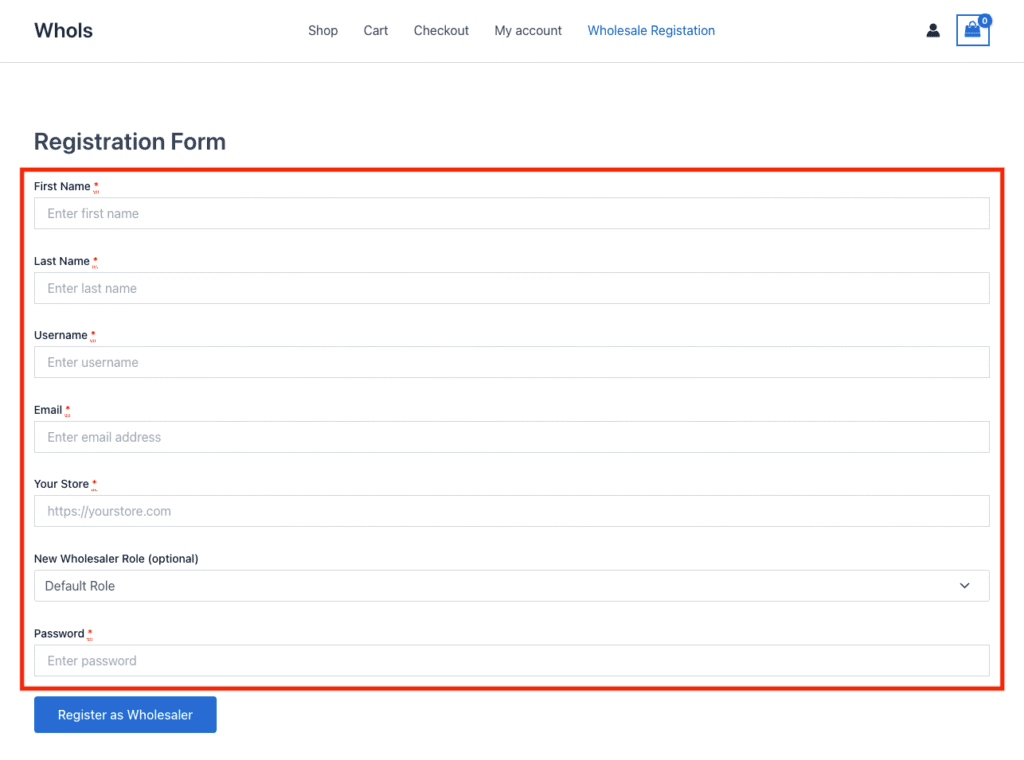
You don’t want just anyone to get wholesale access, so you’ll need a registration and approval workflow.
With Whols, you can:
- Create a dedicated Wholesale Registration form using a shortcode and custom fields.
- Collect business name, tax ID, website, and other verification data.
- Automatically assign a “pending” role on registration.
- Manually review and approve applications before granting full wholesale status.
A typical flow:
1. Create a “Wholesale Registration” page and add the Whols Registration shortcode.
2. Link to it from your header/footer with text like “Wholesale? Apply here.”
3. Set Whols to notify admins when a new wholesale registration is submitted.
4. After reviewing, change the user’s role to your active wholesale role.
Step 7: Replace hidden prices with helpful messages
When prices are hidden, never leave a blank space. Tell users what to do next.
Common messaging patterns:
- For hidden wholesale prices on public product pages: “Wholesale price hidden. Login or [register for a wholesale account] to view.”
- On wholesale-only products (if you allow them to be visible but non-purchasable): “This is a wholesale-only product. Please apply for a wholesale account to order.”
- On the shop/catalog page, when guests browse: “Interested in wholesale pricing? Create a wholesale account to unlock bulk discounts.”
These messages both reduce confusion and gently push serious buyers into your wholesale funnel.
Whols supports “guest access restriction” and related settings to control how guests interact with wholesale content; see the docs for more nuance.
Practical Scenario: Hybrid B2C + B2B WooCommerce Store
Let’s look at a realistic use case.
Scenario
You sell eco-friendly home goods. You want to:
- Sell single units to consumers at retail prices
- Sell cartons and pallets to retailers at wholesale prices
- Keep wholesale pricing hidden from the general public
Implementation with Whols
You might configure things like this:
Roles
- Retail: WooCommerce’s default “Customer” role
- Wholesale: “Wholesale Bronze” and “Wholesale Gold” roles based on order volume
Pricing
- Set wholesale prices 30–40% below retail, with better discounts for “Gold”
- Apply tiered discounts for higher quantities
Visibility
- Category “Wholesale Cartons” visible only to wholesale roles
- Standard categories visible to everyone
- Some new product lines visible only to wholesale during launch
Registration & approval
- “Wholesale Program” info page describing benefits, minimums, and terms
- “Apply for a Wholesale Account” page powered by Whols registration
- Manual review to approve legitimate retailers
UX messaging
- Shop page for guests: “Looking for wholesale? Apply to unlock bulk pricing and B2B-only products.”
- Hidden price sections: “Login to view wholesale prices.”
If you want a broader context on why a structured B2B stack matters, you can also check:
SEO and AI Search Best Practices When Hiding Prices
Hiding prices and products doesn’t mean hiding everything from search engines or AI systems.
1. Keep a crawlable catalog where possible
If you hide your entire store behind a login wall, search engines can’t index product pages. That usually hurts organic traffic.
A better pattern is:
- Keep product pages public.
- Hide only the wholesale prices and B2B actions (e.g., wholesale “Add to Cart”).
- Show clear CTAs to log in or apply for wholesale access.
This approach preserves your ability to rank for product keywords while protecting sensitive prices.
2. Use strong wholesale landing pages
Create at least:
- A Wholesale Program page explaining benefits, requirements, and process.
- A Wholesale Registration page with a form and FAQ.
These pages:
- Help you rank for “[brand] wholesale,” “[industry] wholesale program,” and similar queries.
- Give AI systems a clean, structured explanation to pull from when summarizing your brand.
You can look at posts like “Top 3 Best Wholesale eCommerce Platforms for Success” on the Whols blog as a model for clear, educational landing content:
3. Structure content for AI Overviews and People Also Ask
To increase your chances of being quoted or cited:
- Use question-based headings such as “How do I hide wholesale prices in WooCommerce?”
- Put a direct, one-sentence answer right after each heading.
- Use ordered lists for step-by-step workflows.
- Define important terms (wholesale role, catalog mode, etc.) in simple language.
You’ve already seen this in action throughout this article.
4. Protect UX for logged-out users
When you hide prices from guests:
- Avoid blank spaces or broken buttons.
- Always replace missing elements with helpful text and clear links.
- Make sure login/registration pages are easy to find.
This reduces frustration and encourages serious buyers to take the next step.
When You Might Need a More Advanced B2B Stack
Most small and mid-sized wholesalers can handle their needs with a strong wholesale plugin like Whols. But if you reach the point where you need:
- Contract-level pricing per individual account
- Company accounts with multiple users and permissions
- Deep ERP or PIM integration
- Complex quoting, approvals, and credit terms
Then you might:
- Combine Whols with additional B2B extensions, or
- Look at enterprise-grade B2B platforms or WooCommerce official extensions such as “Wholesale Market for WooCommerce” and “Wholesale for WooCommerce” from the WooCommerce.com marketplace.
Still, for many WooCommerce stores, Whols is enough to:
- Hide wholesale prices and products from non-wholesale customers
- Run hybrid B2C + B2B in one storefront
- Keep everything manageable from the WordPress dashboard.
Watch How to Hide WooCommerce Products from Specific Customers with Whols
Frequently Asked Questions
Q. How do I hide wholesale prices from regular customers in WooCommerce?
A: Use a wholesale plugin like Whols and restrict wholesale prices to specific user roles. Guests and normal “Customer” accounts will see only retail prices or a login message.
Q. Can I hide products completely from non-wholesale customers?
A: Yes. With role-based visibility, you can mark products or categories as “wholesale only” so they appear only for wholesale roles and stay hidden from guests and regular customers.
Q. Do I need to write code to hide prices until login?
A: No. Modern wholesale plugins include “hide price until login” options. You can configure these in the dashboard without editing PHP or adding custom code snippets.
Q. How do I let only approved wholesale users see hidden prices?
A: Create a wholesale registration form, assign new signups a pending role, and manually approve them. After approval, switch them to a wholesale role that unlocks pricing.
Q. Will hiding prices hurt my SEO?
A: It can if you lock the entire store. A better approach is to keep product pages public, hide only wholesale prices, and show CTAs like “Login to view wholesale prices.”
Q. Can I show different prices to different wholesale tiers?
A: Yes. With role-based pricing, you can create multiple wholesale roles and assign different fixed prices or discounts per role and even per product.
Q. What’s the difference between catalog mode and wholesale mode?
Q: Catalog mode hides prices or cart for everyone or guests. Wholesale mode shows different prices and products by role, giving wholesalers a special view while retail sees another.
Conclusion
You don’t need custom code to hide wholesale prices and products from non-wholesale customers in WooCommerce. By using a dedicated wholesale plugin like Whols – B2B WooCommerce Wholesale Solution, you can:
- Create wholesale roles.
- Set role-based prices.
- Hide prices and products by role.
- Add a proper wholesale registration and approval flow.
- Maintain a clean retail experience and strong SEO.
In a world where B2B eCommerce already accounts for tens of trillions of dollars in GMV and keeps growing every year, protecting your wholesale margins and catalog is no longer optional. Start by locking down your wholesale prices and products today, then refine your registration and visibility strategy as your B2B channel matures.
If you’re ready to test this setup, install Whols on a staging site, follow the steps above, and then roll the changes out to your live store once you’re comfortable with the experience.