


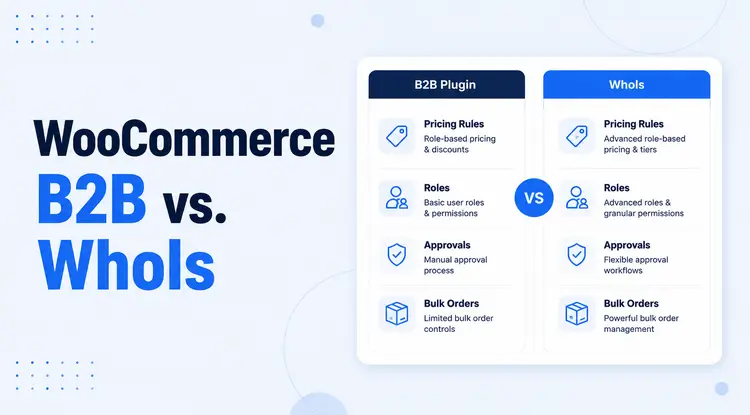
Choosing between WooCommerce B2B and Whols comes down to the type of wholesale store you run and how much complexity you actually need. If your store needs a broad B2B toolkit with deeper configuration options, WooCommerce B2B is a valid option.
If you want a more focused B2B WooCommerce wholesale solution built around wholesale pricing, registration, approvals, and visibility control, Whols is often the more practical choice for small to mid-sized stores and hybrid B2B+B2C setups.
For most comparison shoppers, the real decision is not which plugin has the longest feature list. It is the plugin that helps you run your wholesale workflow with less friction, clearer customer access rules, and a setup that your team can maintain over time.
When store owners search for WooCommerce B2B vs Whols, they usually want a direct answer to one question: which plugin will help them run wholesale pricing, customer approvals, and B2B buying rules without making WooCommerce harder to manage. That is a commercial investigation query, so the best comparison should go beyond surface-level features and focus on daily store operations, buyer experience, and long-term fit.
This comparison takes that practical angle. It looks at wholesale pricing, role management, registration workflows, hidden pricing, product visibility, minimum order rules, ease of setup, documentation, and best-fit use cases so you can decide with more confidence.
Before deciding, it is worth noting that plugin features, compatibility, support terms, and pricing can change over time, so you should always review the latest official product and documentation pages before purchasing or installing any WooCommerce wholesale solution
TL;DR:
- Choose WooCommerce B2B if you need a broader B2B feature set, more granular segmentation, and you are comfortable with a more involved setup process.
- Choose Whols if you want a cleaner wholesale workflow focused on role-based pricing, wholesaler registration, approval control, and hybrid B2B+B2C selling in WooCommerce.
- For many SMB stores, agencies, and wholesale businesses that want practical setup over feature overload, Whols is the easier plugin to shortlist first.
What Are WooCommerce B2B and Whols?
What is WooCommerce B2B?
WooCommerce B2B is a WooCommerce plugin built to support wholesale and business-to-business selling with features such as quantity-based pricing, role or customer-specific pricing adjustments, and B2B customer management. It is designed for merchants that need more than standard WooCommerce pricing and want to create different buying conditions for different business customers.
In plain terms, WooCommerce B2B works best when your store needs more layers of control across pricing, customer groups, and ordering behavior. That can be powerful, but it may also require more planning during setup.
What is Whols?
Whols is a B2B WooCommerce wholesale solution focused on helping store owners set wholesale prices, create wholesaler roles, manage registration and approvals, and control what wholesale customers can see or buy. It is positioned as a WooCommerce wholesale prices plugin with supporting docs and blog resources that focus specifically on wholesale store workflows.
In practical use, Whols is best understood as a wholesale layer for WooCommerce. It helps you build a wholesale-only store or a hybrid B2B+B2C store without needing to over-engineer the setup.
How We Compared These Plugins
This comparison is based on publicly available product pages, feature pages, Whols documentation, Whols tutorial content, and general B2B WooCommerce workflow requirements such as pricing, registration, approvals, visibility control, and order rules. The goal is not to declare one plugin universally better. It is to help store owners compare the two tools against the operational needs that matter most in real wholesale stores.
Because plugin vendors can add, rename, or remove features, this article avoids unsupported claims and recommends checking the latest official pages before making a final decision.
WooCommerce B2B vs Whols: Quick Comparison Table
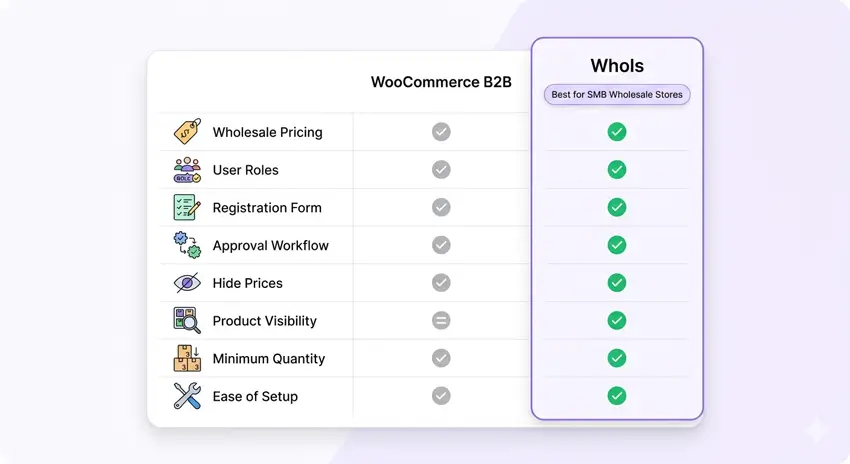
| Feature / Criteria | WooCommerce B2B | Whols | Best for |
| Wholesale pricing | Supports quantity-based pricing and price rules by customer or role. | Supports wholesale prices, discounts, role-based pricing, and multiple pricing models. | Stores that need flexible B2B pricing without manual work. |
| User roles | Supports B2B customer segmentation and role or group-based logic. | Supports wholesaler roles with role-based pricing and access control. | Stores separating wholesale and retail buyers. |
| Registration form | Registration options depend on setup and broader plugin stack. | Built-in wholesale registration with custom fields. | Stores that need a direct wholesaler sign-up flow. |
| Approval workflow | Supports B2B customer approval through account and group handling. | Supports admin approval for wholesale applicants. | Stores that manually verify trade customers. |
| Hide prices | Supports visibility and pricing controls for different customer types. | Can hide or limit wholesale pricing visibility for non-approved users. | Hybrid stores protecting trade pricing. |
| Product visibility | Supports advanced visibility controls by segment or group. | Supports visibility control for wholesale products and roles. | Stores with separate retail and wholesale catalogs. |
| Minimum quantity rules | Supports quantity-based ordering behavior and price logic. | Supports minimum quantity and wholesale order rules. | Bulk-order stores enforcing thresholds. |
| Ease of setup | More flexible, but usually more involved to configure well. | More focused and easier to set up for common wholesale use cases. | SMB stores and agencies wanting faster deployment. |
| Documentation | Product pages and broader B2B plugin documentation are available. | Dedicated docs, tutorials, and use-case articles are available. | Teams that want guided setup help. |
| Ideal store type | Complex B2B stores with more advanced segmentation needs. | Small to mid-sized wholesale stores and hybrid B2B+B2C WooCommerce sites. | Businesses choosing based on operational simplicity. |
Key Differences Between WooCommerce B2B and Whols
The main difference in WooCommerce B2B vs Whols is scope. WooCommerce B2B aims to cover broader B2B requirements with more layered controls, while Whols focuses on the wholesale features many WooCommerce stores use most often, such as pricing by role, registration approval, visibility control, and order rules.
That difference matters because more features are not always better. A plugin that does more on paper can still be the worse fit if it creates extra setup overhead, more room for mistakes, or workflows your team will not actually use.
The setup philosophy is different
WooCommerce B2B is often a better fit when your wholesale operation already has complexity built in, such as multiple buyer segments, more advanced discount logic, or a larger catalog that needs tighter control. Whols is often a better fit when you want to launch or simplify wholesale selling in WooCommerce using a clear role-based structure and practical controls that store managers can maintain day to day.
The buyer journey is different
For wholesale stores, plugin choice is not just about admin settings. It also affects what trade customers see, how they apply, how quickly they get approved, and whether they can place orders without confusion. Whols places more visible emphasis on those frontline wholesale workflows, especially around registration forms, role assignment, pricing display, and product access.
Wholesale Pricing and Customer Role Management
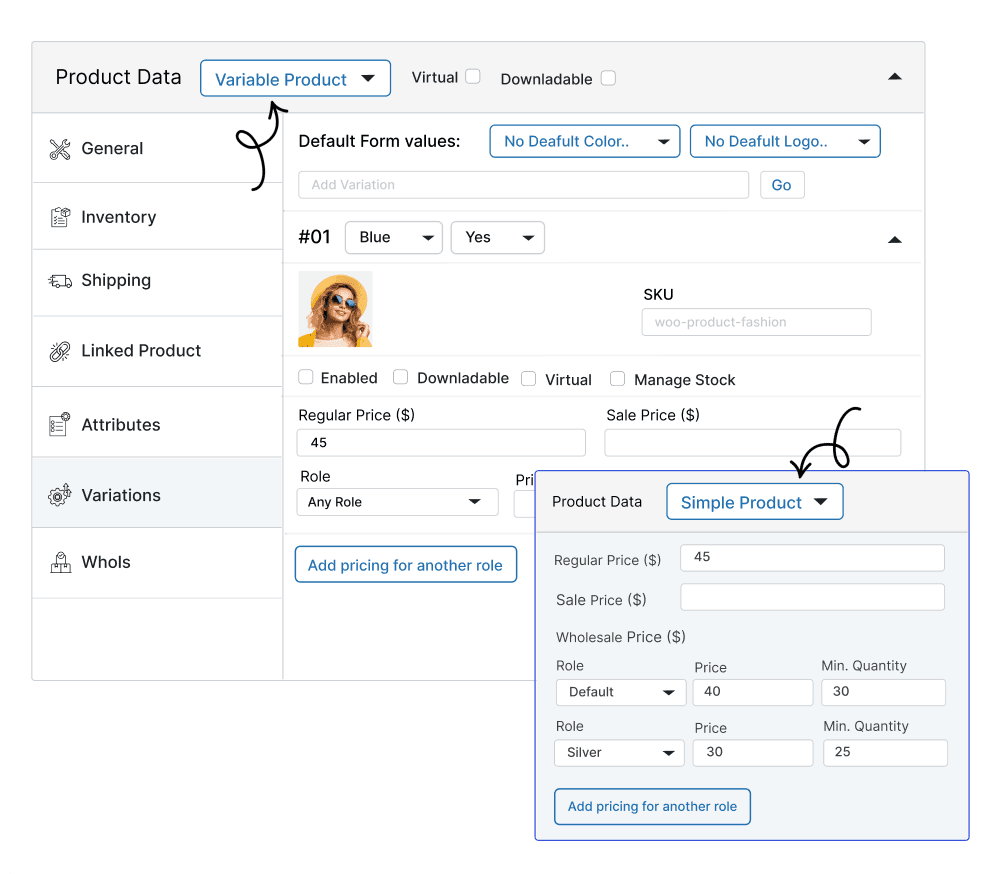
For most buyers comparing WooCommerce B2B vs Whols, pricing control is the first decision point. Both plugins support B2B pricing beyond standard WooCommerce, but they frame pricing rules in different ways.
WooCommerce B2B supports quantity-based pricing and price adjustments tied to customers or roles, which can be useful when different business buyers negotiate different conditions or buy at different scales. This is valuable if your pricing model needs to reflect customer-specific agreements or more advanced segmentation.
Whols supports wholesale pricing models tied to wholesaler roles, with the ability to define discounts or wholesale prices and set minimum quantity rules for trade customers. For many stores, this is enough to create a practical pricing structure such as “retail,” “standard wholesale,” and “premium wholesale” without making the pricing model too difficult to manage.
Which pricing setup is easier to manage?
For straightforward role-based wholesale pricing, Whols is typically easier to understand because it is centered on wholesale roles and common wholesale logic. WooCommerce B2B may be the better option when your pricing setup is more nuanced, and you have the time to configure and test those conditions carefully.
Registration and Approval Workflow
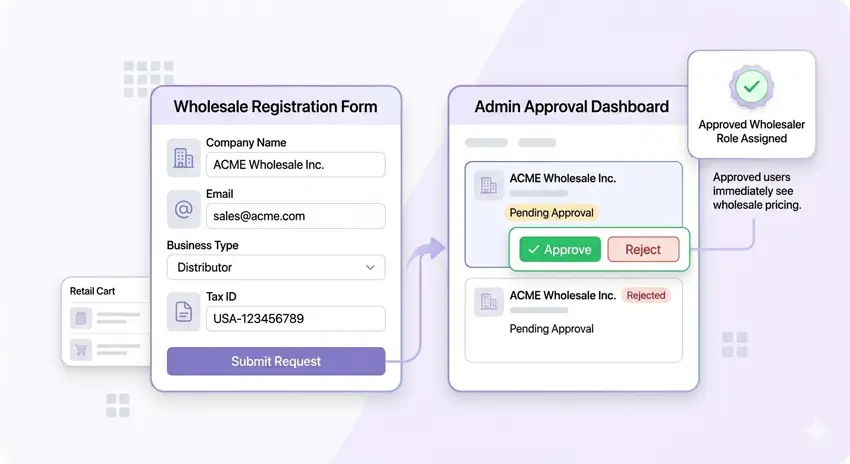
B2B stores often need to screen buyers before showing them trade prices or wholesale-only products. That makes registration and approval workflow one of the most important parts of any WooCommerce wholesale solution.
WooCommerce B2B supports business customer management, but registration setup can depend more on your overall site configuration and how you want to handle forms and segmentation. That is workable for experienced teams, but it can introduce more decisions during setup.
Whols includes a built-in wholesale registration form and lets you add custom fields for business onboarding, such as company details and other wholesale-specific requirements. It also supports admin review and approval, so wholesale access can stay restricted until a buyer is verified.
Why this matters in real stores
The registration workflow shapes first impressions for your B2B buyers. If the form is confusing or approval rules are unclear, you can lose qualified buyers before they ever place an order. A cleaner registration and approval path is one of the strongest reasons many growing wholesale stores choose a focused tool like Whols.
Hiding Prices and Products From Retail Customers
A common reason people search for WooCommerce B2B vs. Whols is that they do not want retail visitors seeing wholesale prices or trade-only products. That is especially common in hybrid stores serving both direct-to-consumer and trade buyers from one WooCommerce installation.
WooCommerce B2B supports role or customer-based visibility controls, which can help create segmented experiences for different user types. Whols also supports visibility control and allows wholesale pricing or access to be restricted to approved wholesaler roles, which is often what hybrid stores need first.
Which plugin is better for hybrid B2B+B2C stores?
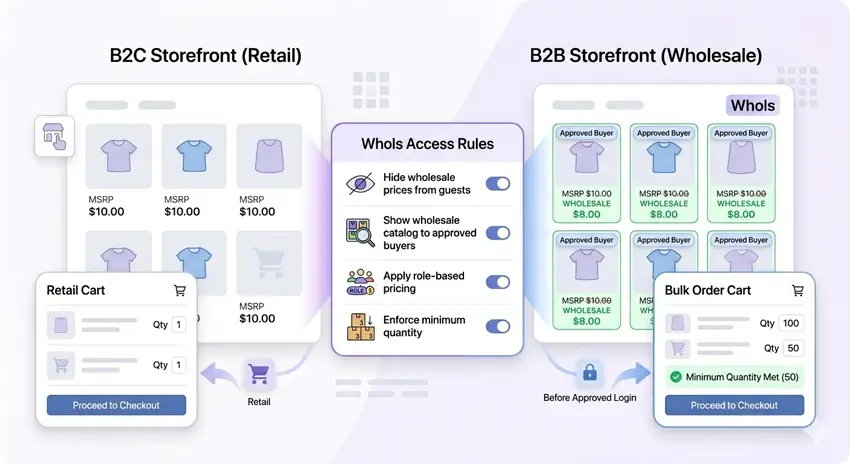
If your main goal is to run retail and wholesale in one store, Whols has a strong practical advantage because its content and setup resources explicitly support hybrid WooCommerce workflows. If your hybrid store also requires deeper segmentation logic or more advanced B2B behavior, WooCommerce B2B may still be worth considering.
Ease of Setup and Daily Store Management
A plugin can look strong in a feature list and still create unnecessary operational work after launch. That is why ease of setup and day-to-day management deserve their own section in any serious WooCommerce B2B vs Whols comparison.
WooCommerce B2B gives you more room to configure wholesale behavior in detail, but that flexibility can create a longer setup path and a higher testing burden, especially for agencies handling multiple client projects. Whols is more focused, which usually makes it easier for store owners or client teams to understand how roles, pricing, registration, and visibility settings work together.
Common management tasks to think about
Before choosing a plugin, ask which tool will make these tasks easier over time:
- Updating wholesale prices when supplier costs change.
- Reviewing new wholesale applicants and assigning access.
- Hiding or revealing products for different buyer groups.
- Explaining the setup to a team member or client after launch.
- Troubleshooting pricing display issues without needing a developer every time.
A plugin that simplifies these recurring tasks often creates more business value than one that simply offers more advanced settings.
Official References and Documentation
If you are making a purchase decision, these are the most useful official pages to check before finalizing your choice:
- WooCommerce B2B official product page for current product overview and positioning.
- WooCommerce B2B feature page for the latest feature-specific details.
- Whols main product page for core plugin overview and current messaging.
- Whols documentation hub for setup help and feature documentation.
- Whols wholesale registration form guide for a practical example of the registration workflow.
Workflow Features That Matter in Real Wholesale Stores
Many comparison posts stay too general. Real plugin buyers usually want to know whether the tool supports common wholesale workflows that affect sales operations every week.
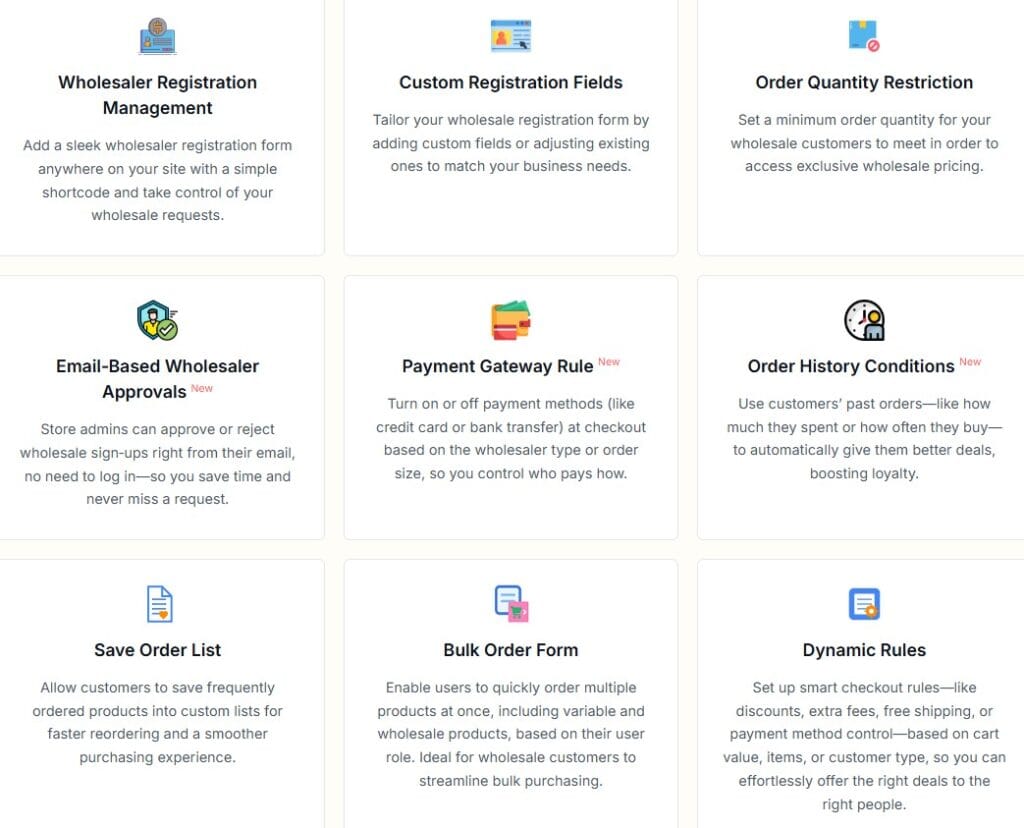
For Whols, those workflow-focused areas include role-based product pricing, custom registration fields, product visibility settings, minimum quantity rules, saved order list support, and order-related wholesale controls documented across the plugin site and docs. That gives Whols stronger practical relevance for store owners who want a workflow-driven wholesale setup rather than just a list of abstract B2B features.
For WooCommerce B2B, the official positioning emphasizes quantity-based pricing, pricing adjustments, and broader B2B customer control. If those are your main needs, it remains a credible option, but you should confirm the latest feature list and compatibility details before making a final decision.
Best Use Cases: Which Plugin Fits Your Store?
Choose WooCommerce B2B if…
- Your wholesale business has multiple customer segments and more advanced pricing logic.
- You need deeper control across larger B2B catalogs or customer-specific conditions.
- Your team or agency is comfortable handling a more involved setup process.
Choose Whols if…
- You want a focused B2B wholesale plugin for WooCommerce with practical role-based pricing and approval workflows.
- You run a hybrid B2B+B2C store and need to hide or limit wholesale pricing visibility for non-approved users.
- You want to launch wholesale faster and reduce admin complexity for your team or clients.
- You need documentation and setup guides around common WooCommerce wholesale scenarios.
Best for Breakdown
| Store type or need | Better fit | Why |
| Small wholesale WooCommerce store | Whols | Focused setup, practical wholesale controls, and easier role-based workflows. |
| Hybrid retail + wholesale store | Whols | Better alignment with common hybrid visibility and approval workflows. |
| Complex B2B catalog with many pricing layers | WooCommerce B2B | Broader pricing and segmentation orientation. |
| Agency building repeatable client wholesale stores | Whols | Faster deployment and easier handoff to clients in many common projects. |
| Team needing advanced B2B logic first | WooCommerce B2B | More likely to suit high-complexity B2B requirements. |
Practical Example: A WooCommerce Store Selling to Retail and Wholesale Buyers
Imagine a WooCommerce store that sells coffee equipment to home users but also supplies cafes and small retailers. Retail buyers should see normal prices and buy single items, while approved wholesale buyers should see trade pricing, minimum quantity requirements, and a dedicated registration route.
In that scenario, a plugin like Whols fits well because it can support a separate wholesale registration process, role-based pricing, approval control, and visibility rules inside the same WooCommerce store. That allows the store owner to keep retail and wholesale operations together without exposing wholesale pricing to every visitor.
A practical Whols workflow could look like this
- A trade buyer lands on a wholesale registration page and submits company details using custom form fields.
- The store owner reviews the application and approves the account for a wholesaler role.
- The approved buyer logs in and sees wholesale pricing, role-based access, and any quantity-related buying rules.
- Retail buyers continue to see the standard storefront without access to wholesale-only pricing or products.
This is the kind of real-world use case that matters more than generic “feature count” comparisons.
Pros and Cons
WooCommerce B2B pros and cons
Pros
- Broad B2B feature orientation for stores with more advanced needs.
- Helpful for quantity-based pricing and deeper customer segmentation.
- A good fit for merchants willing to invest more time in configuration.
Cons
- Can be more complex than many SMB wholesale stores actually need.
- Setup and testing may take longer.
- Some teams may prefer a more focused workflow-first plugin.
Whols pros and cons
Pros
- Focused on practical wholesale selling inside WooCommerce.
- Strong fit for role-based pricing, approvals, and hybrid store visibility control.
- Easier to understand for many store owners and agencies.
- Backed by supporting docs and wholesale-specific content resources.
Cons
- More specialized around wholesale workflows than broader B2B complexity.
- Stores with unusually advanced B2B logic should confirm the current feature scope first.
- As with any WooCommerce plugin, the latest feature list and compatibility details should be reviewed before purchase.
Which Plugin Should You Choose?
If you need broad B2B functionality and you know your store requires more advanced segmentation or pricing logic, WooCommerce B2B may be the better fit. If you mainly need to run a clean and efficient wholesale workflow in WooCommerce, Whols is often the stronger choice because it stays close to the features most wholesale stores use every day.
That makes Whols especially attractive for growing wholesale businesses, mixed retail-and-wholesale stores, and agencies building practical client solutions that need to be easy to manage after launch. In other words, WooCommerce B2B vs Whols is less about which plugin is universally better and more about which one fits your operational reality better.
Read More: To build a more informed wholesale setup, these related resources from the Whols blog can naturally support this article and strengthen topical authority across the site:
- Create a B2B + B2C Hybrid WooCommerce Store for stores that want one site for retail and wholesale buyers.
- How to Set Wholesale Prices in WooCommerce for pricing strategy and implementation basics.
- How to Set Up a WooCommerce Wholesale Registration Form for wholesaler onboarding and approvals.
Frequently Asked Questions
What is the main difference between WooCommerce B2B and Whols?
WooCommerce B2B is oriented toward broader B2B functionality and deeper pricing or segmentation controls, while Whols focuses more tightly on wholesale pricing, wholesaler roles, registration, approvals, and visibility management inside WooCommerce.
Is Whols good for small WooCommerce wholesale stores?
Yes. Whols is well suited to small and mid-sized wholesale stores because it focuses on the core wholesale features many merchants need most, including role-based pricing, registration, and approval workflows.
Can I use Whols to hide prices from non-wholesale customers?
Whols supports visibility and role-based pricing controls that can help limit wholesale pricing access to approved wholesale users rather than public visitors or standard retail customers.
Which plugin is easier to set up for B2B pricing?
For many standard wholesale stores, Whols is easier to set up because it is built around common wholesale pricing workflows and user roles. WooCommerce B2B can be more suitable when your pricing and customer segmentation needs are more complex.
Do I need a wholesale plugin for WooCommerce B2B selling?
If you want features like trade pricing, role-based access, buyer approval, hidden pricing, or minimum quantity rules, a dedicated wholesale or B2B plugin is usually the practical way to add that functionality to WooCommerce.
Which is better for agencies building WooCommerce wholesale stores?
That depends on project complexity. Agencies building more advanced B2B systems may lean toward WooCommerce B2B, while agencies delivering faster, easier-to-manage wholesale builds may find Whols more efficient for common client needs.
Conclusion
The best choice between WooCommerce B2B and Whols depends on whether your store needs broader B2B complexity or a more focused wholesale workflow. For many WooCommerce merchants, the winning plugin is the one that handles trade pricing, approvals, visibility control, and role-based access cleanly without slowing the business down.
If your goal is to build a wholesale-ready WooCommerce store with less friction and a clearer admin workflow, Whols deserves serious consideration as a practical B2B WooCommerce wholesale solution. Reviewing the latest Whols features, docs, and setup guides before rollout is the best next step if your store is preparing to launch or improve wholesale selling.