


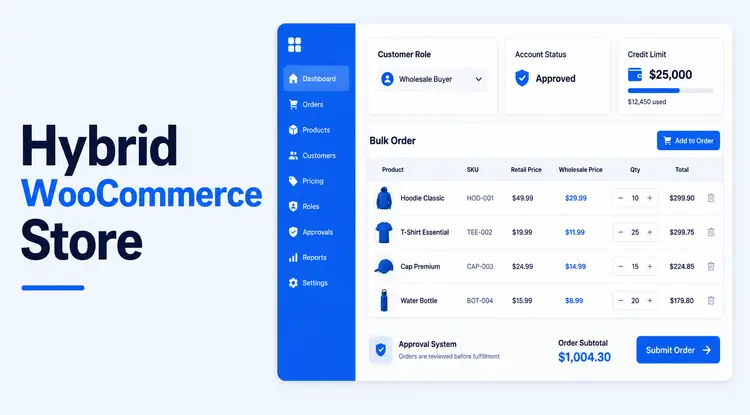
A B2B + B2C hybrid WooCommerce store lets you serve retail shoppers and wholesale buyers from the same website while showing each segment the right prices, catalog, and buying experience. Instead of managing two separate stores, you configure WooCommerce with a B2B wholesale plugin like Whols to handle wholesale roles, pricing, and rules on top of your existing B2C setup.
Quick-answer (TL;DR)
A B2B + B2C hybrid WooCommerce store lets you sell to both retail shoppers and wholesale buyers from a single site by showing different prices, catalogs, and rules to each customer group. You can create this hybrid setup in WordPress by combining WooCommerce with a wholesale plugin like Whols to manage wholesaler roles, separate wholesale pricing, minimum quantities, and order flows while keeping your public B2C storefront intact.
TL;DR: How to build a B2B + B2C hybrid WooCommerce store
- Keep one WooCommerce store for everyone.
- Create separate customer groups/roles for B2B and B2C users.
- Show different prices (retail vs wholesale) and rules based on the logged‑in user’s role. Use a wholesale plugin like Whols – B2B WooCommerce Wholesale Solution to manage wholesale pricing, registration, approvals, and bulk rules without a custom role.
- Optimize the experience and checkout flow for both segments, then track revenue from each.
If you already run a WooCommerce retail store, you can usually add wholesale capabilities in a few hours using the right plugin and a structured setup process.
Table of Contents
What is a B2B + B2C hybrid WooCommerce store?
A B2B + B2C hybrid WooCommerce store is a single WordPress site that sells to both businesses and individual shoppers by tailoring prices, catalogs, and purchasing rules to each customer type. Retail visitors see standard product pages and consumer pricing, while logged‑in wholesalers see wholesale prices, bulk discounts, and possibly a different product selection.
Typical hybrid features include:
- Role‑based pricing (retail vs wholesale vs custom groups).
- Separate registration flows and approvals for B2B customers.
- Minimum order quantities and order amount thresholds for wholesale orders.
- Ability to hide certain products or prices from non‑wholesale visitors.
- Bulk order forms or quick‑order lists for repeat B2B buyers.
WooCommerce provides the core eCommerce engine, while a wholesale plugin adds these B2B‑specific controls on top.
If you’re new to wholesale concepts, it’s worth reading What is Wholesale Pricing? Benefits, Strategies, and Examples for Success first.
Why run a hybrid store instead of two separate sites?
Many store owners start with a retail WooCommerce shop and later add wholesale channels as their business grows. Running separate B2B and B2C sites can work, but it also creates friction and overhead.
A B2B + B2C hybrid WooCommerce store offers several advantages:
- Lower maintenance: One catalog, one WordPress install, one set of updates and security checks instead of two.
- Unified inventory: Stock levels, backorders, and product data stay in sync across both B2B and B2C sales.
- Better SEO and marketing: All your product and content authority accumulates on one domain, which can help organic visibility over time.
- Simpler analytics: You can track total revenue, plus segment performance by customer type, without merging data from multiple properties.
- Faster scaling: When you launch new products or categories, you can decide once how to show them to B2B and B2C buyers.
Competitor plugins like B2BKing and Wholesale Suite also promote hybrid setups for these reasons, showing that this model is now a standard in WooCommerce B2B.
To see how hybrid selling fits into a larger growth strategy, you can later read How to Grow Wholesale Business (6 Unique Strategies).
Core building blocks of a B2B + B2C hybrid WooCommerce store
Before you dive into configuration, it helps to understand the main components you’ll set up.
1. Customer roles and groups
Hybrid stores rely on segmenting customers into roles or groups: for example, “Guest/B2C,” “Approved Wholesale,” and “Distributor.”
Key concepts:
- B2C visitors: Guests and standard customers, usually auto‑approved.
- B2B customers: Users who apply for wholesale access and are manually or conditionally approved.
- Custom tiers: Multiple wholesale levels with different discounts or minimums.
Wholesale plugins like Whols add wholesaler roles and let you assign customers to them without custom coding.
If you want to dive deeper into how wholesale orders work inside your business model, you can check What Is a Wholesale Order?: How It Works and Impact on Your Business.
2. Role‑based pricing and discounts
The biggest difference between B2B and B2C is pricing.
Common pricing patterns in hybrid WooCommerce stores:
- Fixed wholesale prices per product for specific roles.
- Global percentage discounts per role (e.g., 30% off catalog for “Wholesale” customers).
- Tiered pricing by quantity (e.g., 10 units, 50 units, 100 units).
- Dynamic pricing rules that adjust based on order size or customer history.
Whols is designed to let you set wholesale prices and dynamic rules without duplicating products, which is something many store owners specifically look for.
For a deeper explanation of B2B price logic, see What Is Dynamic Pricing in B2B Wholesale? A Complete Guide.
3. Registration, approval, and access control
You’ll also need different registration and access flows:
- Public store and checkout for regular shoppers.
- Wholesale registration forms capturing company details, tax ID, or resale certificates.
- Optional manual approval for wholesale accounts.
- Rules to hide wholesale pricing or products from non‑approved users.
Whols provides a wholesaler registration form, role‑specific registration, and approval controls so you can keep wholesale access gated.
You can follow the docs here:
4. UX for B2B vs B2C buyers
B2B buyers often need:
- Quick bulk ordering from a list view.
- Ability to reorder past purchases fast.
- Clear visibility into volume discounts and minimum quantities.
B2C buyers expect:
- Standard product pages with high‑quality images and reviews.
- Simple checkout with consumer‑friendly payment methods.
A good hybrid implementation lets both groups buy efficiently without feeling like the site is “not meant for them.”
How to create a B2B + B2C hybrid WooCommerce store: Step‑by‑step
This walkthrough assumes you already have a WooCommerce store running on WordPress. If you’re starting from scratch, you’ll set up WordPress and WooCommerce first, then follow these steps.
Step 1: Clarify your B2B and B2C strategy
Before touching settings, define:
- Which customer types you’ll serve (retail, wholesale, distributors, resellers).
- Whether all products are available to both B2B and B2C, or if some are wholesale‑only.
- Your target minimum order values and quantities for wholesale.
- Whether you need multiple wholesale tiers.
This strategy will drive how you configure roles, pricing rules, and visibility.
Example scenario:
- B2C: Anyone can buy at retail prices, no approval needed.
- B2B: Registered wholesalers get 40% off catalog, must order at least 10 units per SKU, and have a minimum order value of $200.
If pricing is new to you, read How to Calculate Retail Price from Wholesale and Markup to make sure your retail and wholesale margins stay healthy.
Step 2: Install and configure a wholesale plugin (Whols)
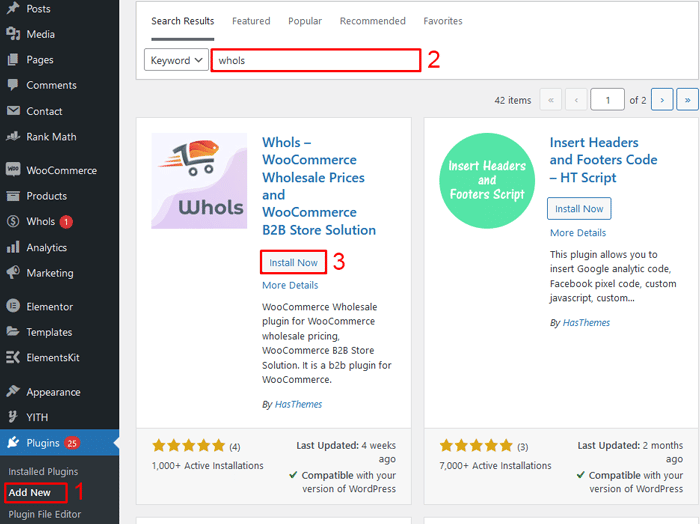
To turn WooCommerce into a hybrid store, you’ll need a wholesale pricing plugin.
Plugins like B2BKing, Wholesale Suite, and Wholesale for WooCommerce are common in this space, but Whols – B2B WooCommerce Wholesale Solution is specifically built to transform a WooCommerce store into a B2B or B2B+B2C hybrid store.
With Whols, you can:
- Add wholesaler roles to your site.
- Set wholesale prices per product or category.
- Create dynamic pricing rules and minimum quantities.
- Build wholesale registration forms and manage approvals.
- Show retail and wholesale prices side by side or separately.
Install Whols as you would any plugin, then follow its setup documentation to connect it with your existing WooCommerce catalog.
Step 3: Set up customer roles and access rules
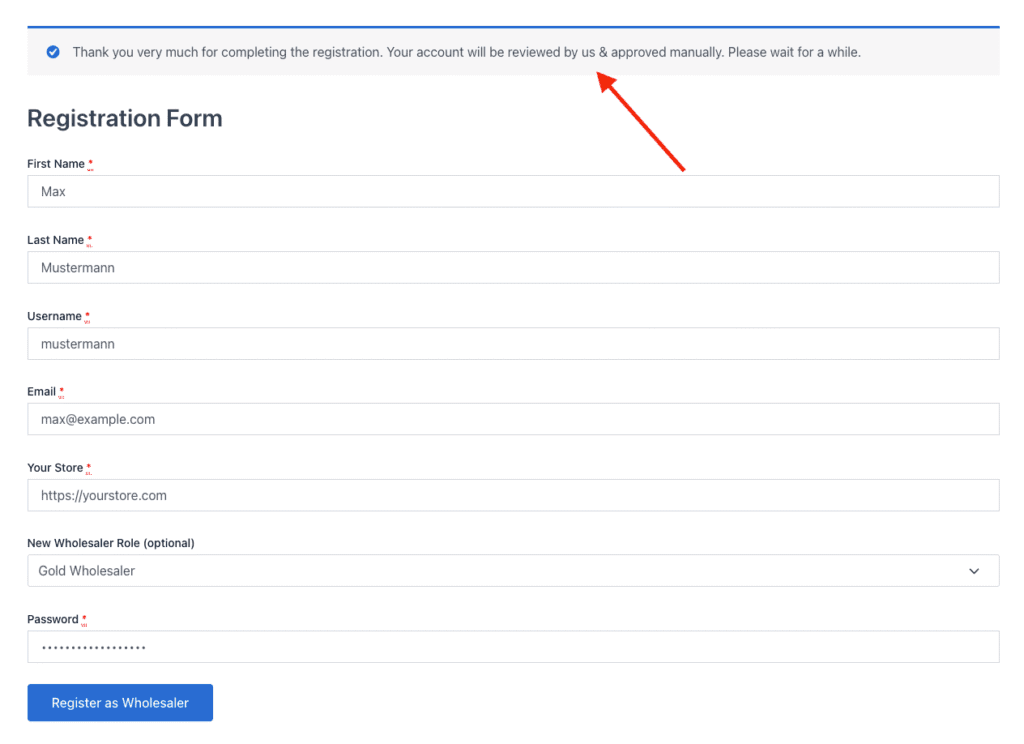
Next, configure how users are classified as B2B or B2C:
- Keep “Customer” or “Guest” as your default B2C role.
- Use Whols to create one or more wholesaler roles (e.g., “Wholesale,” “Distributor”).
- Map registration flows so that:
- Standard WooCommerce registration sends users to B2C.
- Wholesaler registration form sends applications into a “pending” or “review” state.
- Restrict wholesale prices and certain products so they are only visible to users with an approved wholesale role.
This separation is what makes your store a true B2B + B2C hybrid WooCommerce store instead of a single‑segment site.
You can follow the step‑by‑step guide in Set up Wholesaler Registration & Login while doing this.
Step 4: Configure retail and wholesale pricing
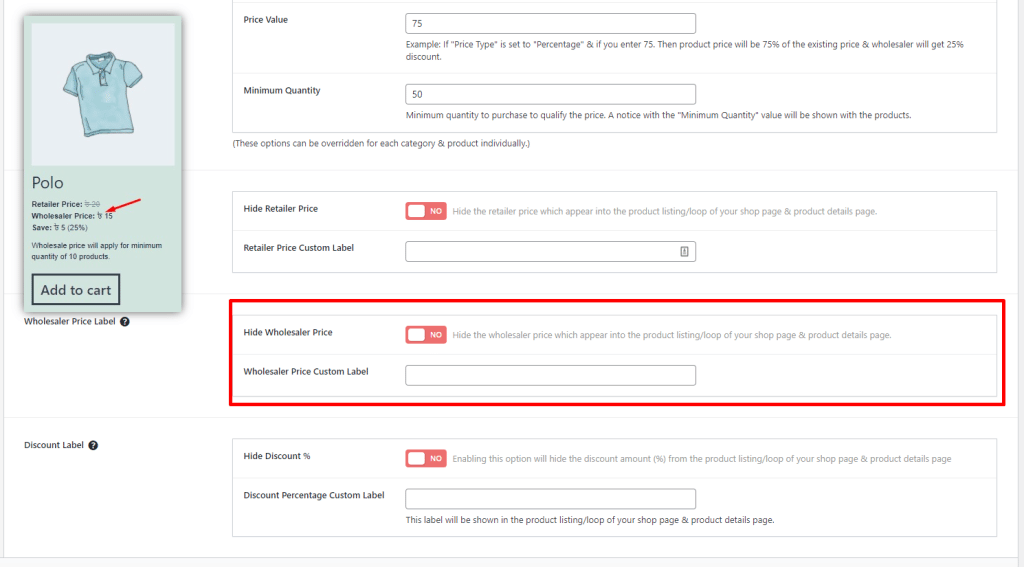
Now configure the retail vs wholesale prices for your products.
With Whols, you can:
- Set specific wholesale prices for each product and variation.
- Apply role‑based discounts globally or by category.
- Create advanced rules such as “10% extra discount for orders above $1,000.”
Best practices:
- Keep B2C pricing in standard WooCommerce product fields.
- Set wholesale prices in separate fields so you don’t need duplicate products.
- Use tiered pricing for high‑volume SKUs to encourage larger orders.
According to McKinsey and other B2B commerce studies, B2B buyers increasingly expect transparent, self‑serve pricing similar to B2C experiences, which makes clear role‑based price display crucial. (For example, McKinsey’s 2021 B2B Pulse reports strong growth in digital self‑service channels.)
To understand wholesale margins and seasonal adjustments, you can also review:
Step 5: Control catalog visibility and minimums
Many hybrid stores only want wholesale customers to see certain pricing or products.
Use your wholesale plugin to:
- Hide wholesale‑only products from guests and standard customers.
- Show “Login to see wholesale prices” messaging where appropriate.
- Set minimum order quantities and order value for wholesale roles (e.g., min 10 units per SKU, min cart total $200).
- Configure tax and shipping rules specific to wholesale orders if needed.
Whols includes tools like minimum quantity rules and product visibility settings to handle these scenarios without writing custom code.
You can see an example in How to Set Up Auto Apply Minimum Quantity in Whols WooCommerce Wholesale Plugin and general visibility options in Others Settings.
Step 6: Optimize UX for B2B buyers
Your B2B customers are often repeat buyers who want speed and clarity.
Enhance their experience by:
- Adding a bulk order form that lets wholesalers add multiple SKUs and quantities in one screen.
- Enabling “save order lists” or quick reorders for frequent purchases.
- Showing volume discounts right on product pages.
- Offering payment options suited for B2B, such as bank transfer, invoices, or net‑terms (if supported by your stack).
Whols provides a bulk order form and features focused on streamlining wholesale orders inside WooCommerce, documented in its How‑To docs under Docs → How To.
Step 7: Test the hybrid journey end‑to‑end
Before going live, walk through the experience as both a B2C shopper and a B2B buyer:
- As a guest:
- Browse products.
- See only retail pricing.
- Complete checkout with standard payment methods.
- As a new wholesale applicant:
- Submit the wholesale registration form.
- Check how approval emails and status updates look.
- As an approved wholesaler:
- Log in and confirm that wholesale prices and rules are applying correctly.
- Place a bulk order and verify discounts, taxes, and shipping.
Fix any inconsistencies, then document your internal processes for approving wholesalers and managing pricing changes.
Practical example: Converting an existing B2C WooCommerce store into a hybrid store
Imagine you run a WooCommerce store selling home décor to retail customers and now want to add wholesale buyers such as boutique store owners.
Here’s how you’d implement a B2B + B2C hybrid WooCommerce store with Whols:
- Install Whols on your existing store.
- Enable wholesaler roles and create “Wholesale” and “Distributor” tiers.
- Add a “Wholesale Application” page using the Whols registration form builder, collecting business name, tax ID, and website.
- Configure wholesale prices for selected products (e.g., 40% off retail for Wholesale, 50% off for Distributor).
- Set a minimum order quantity of 12 units per SKU for wholesale roles using Whols’ auto‑apply minimum quantity feature.
- Hide certain “bundle” SKUs so only wholesalers see them.
- Test the journey from application to approval to first wholesale order.
You now serve both your original B2C audience and a new B2B channel from one WooCommerce store, with clear pricing and processes for each segment.
Measuring success: KPIs for your hybrid store
Once your hybrid store is live, track performance for both B2B and B2C segments.
Useful metrics include:
- Number of wholesale registrations and approval rate.
- Average order value (AOV) for B2B vs B2C customers.
- Order frequency and repeat purchase rate from wholesale accounts.
- Gross margin after discounts and shipping for wholesale orders.
- Percentage of total revenue coming from B2B vs B2C.
For improving profitability on the B2B side, pair your tracking with the ideas in How To Boost Wholesale Profit Margins: 7 Key Strategies.
When Whols is a good fit for your B2B + B2C hybrid WooCommerce store
Whols is especially useful if you:
- Already run a WooCommerce B2C store and want to add wholesale without rebuilding.
- Need role‑based wholesale prices without duplicating products.
- Want built‑in wholesale registration, approval, and role management.
- Care about dynamic pricing rules, minimum quantities, and bulk ordering.
- Prefer a solution focused specifically on B2B and B2B+B2C hybrid use cases.
Frequently Asked Questions
What is a B2B + B2C hybrid WooCommerce store?
A B2B + B2C hybrid WooCommerce store is a single WordPress site that sells to both consumers and businesses by showing different prices, catalogs, and rules based on the customer’s role.
Do I need two separate WooCommerce stores for B2B and B2C?
No, you can serve both segments from one store by using roles, role‑based pricing, and catalog visibility, which is exactly what a hybrid setup with a wholesale plugin is designed to do.
How do I show different prices to wholesale and retail customers in WooCommerce?
You install a wholesale pricing plugin, create B2B roles, and configure wholesale price fields or dynamic pricing rules, so WooCommerce displays the appropriate price based on the logged‑in user’s role.
Can I hide wholesale prices from regular visitors?
Yes, most B2B plugins, including Whols, allow you to hide wholesale prices and even entire products from guests and standard customers, so only approved wholesalers see special rates.
How do I handle wholesale registration and approvals?
Use a wholesale registration form to collect business details, then manually approve or auto‑approve based on your criteria while assigning the right wholesale role when you approve an account.
Is Whols the only option for a hybrid WooCommerce store?
No, there are other wholesale plugins such as B2BKing, Wholesale Suite, and Wholesale for WooCommerce, but Whols is built specifically to convert a standard WooCommerce store into a B2B or B2B+B2C hybrid store with role‑based pricing and registration built in
Will a hybrid setup hurt my SEO?
It usually helps SEO because you consolidate content and backlinks on one domain; just avoid duplicate content and ensure important public pages remain crawlable for search engines.
Conclusion
A B2B + B2C hybrid WooCommerce store lets you grow beyond consumer sales and tap into wholesale revenue without managing multiple sites.
By combining WooCommerce with a wholesale solution like Whols, you can manage roles, pricing, registration, and ordering flows in a way that makes sense for both retail shoppers and wholesale buyers.
Start with clear segmentation, set up roles and pricing rules carefully, and then optimize the experience for each customer group. Done well, a hybrid model can significantly increase your average order values, smooth inventory management, and strengthen your brand’s presence across both B2C and B2B markets.