


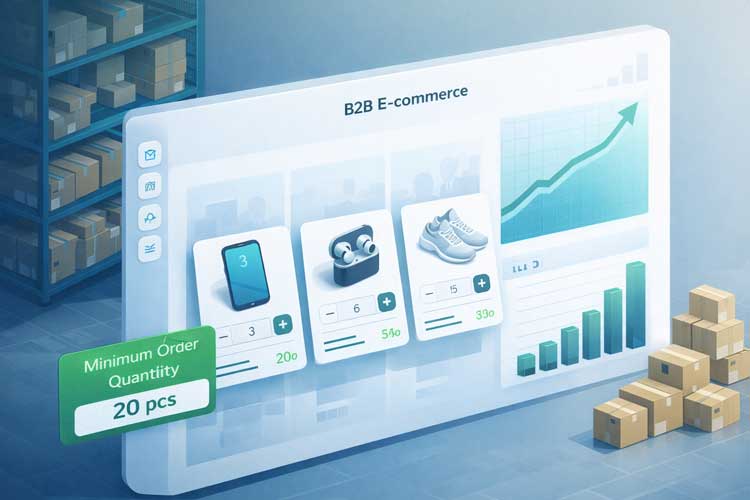
Margins are under pressure across B2B and wholesale as input costs, marketing costs, and buyer expectations all rise.
At the same time, B2B ecommerce is exploding: global B2B ecommerce volumes are in the tens of trillions of dollars and still growing at double-digit rates. In this environment, every unprofitable order quietly erodes your bottom line.
Modern B2B buyers also behave differently. Various industry reports show that a large majority of B2B buyers now prefer digital or remote interactions over traditional sales-led processes, and many complete most of their buying journey before speaking with sales.
That means your online store, pricing structure, and order rules must quietly enforce your economics without manual intervention.
Minimum Order Quantity (MOQ) sits at the center of this challenge. Done well, it ensures that every wholesale or bulk order:
- Covers production and sourcing costs
- Justifies the time and labor needed to fulfill the order
- Contributes adequate profit per order, not just per unit
In platforms like WooCommerce, especially when combined with a wholesale plugin such as Whols Minimum Order Quantity becomes a programmable policy rather than an informal guideline.
This guide breaks down how to design, implement, and optimize Minimum Order Quantity strategies that protect profits, increase average order value, and still feel fair and transparent for buyers.
What Is Minimum Order Quantity (MOQ) and Why It Matters
Core definition
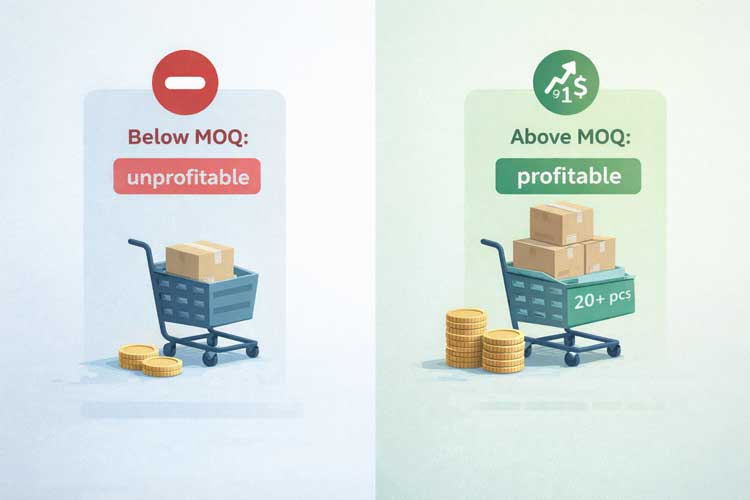
Minimum Order Quantity (MOQ) is the smallest quantity of a product that a supplier, manufacturer, or seller is willing to sell in a single order. It can be defined as:
- A number of units (e.g., 100 units of a SKU)
- A minimum spend (e.g., $500 per order)
- A hybrid rule (e.g., 50 units and at least $300 order value)
Example: A manufacturer might set a Minimum Order Quantity of 1,000 units for a product to make a production run worthwhile. Any order below that level would either be refused or priced at non-wholesale rates.
Wholesalers and brands can also apply Minimum Order Quantity downstream, requiring retailers or B2B customers to order at least a certain volume or spend per order to access wholesale pricing or certain delivery terms.
Simple vs Complex MOQ
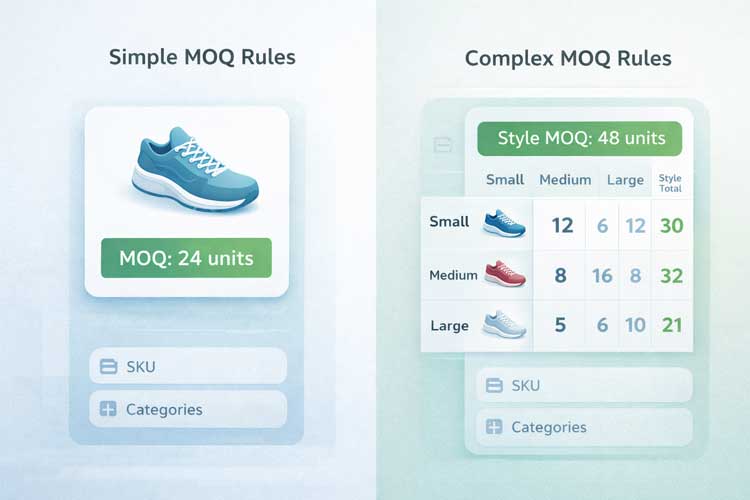
Most businesses use one of two broad approaches:
- Simple MOQ
A single minimum (units or currency) per product or per order. Example: “Minimum 24 units per SKU” or “$300 minimum order value”. It’s easy to explain and enforce. - Complex MOQ
Multiple constraints or conditions. Example: minimum 12 units per size and 72 units total per style (common in apparel), or minimum $500 per order and at least 3 categories. It better reflects production and inventory realities but is harder to communicate.
MOQ vs EOQ (Economic Order Quantity)
A common confusion is between Minimum Order Quantity and Economic Order Quantity (EOQ):
- Minimum Order Quantity: A constraint—”we will not accept an order smaller than X”—usually based on cost coverage and margin.
- EOQ: A calculated “ideal” order quantity that minimizes the total ordering plus holding costs for a SKU.
In practice:
- You estimate EOQ based on demand and cost drivers.
- You ensure your Minimum Order Quantity is at or above the level required to keep each order profitable, without pushing it so high that you damage conversion or tie up excessive capital in inventory.
Designing an MOQ Strategy That Protects Profits
1. Start with Your Costs and Target Margins
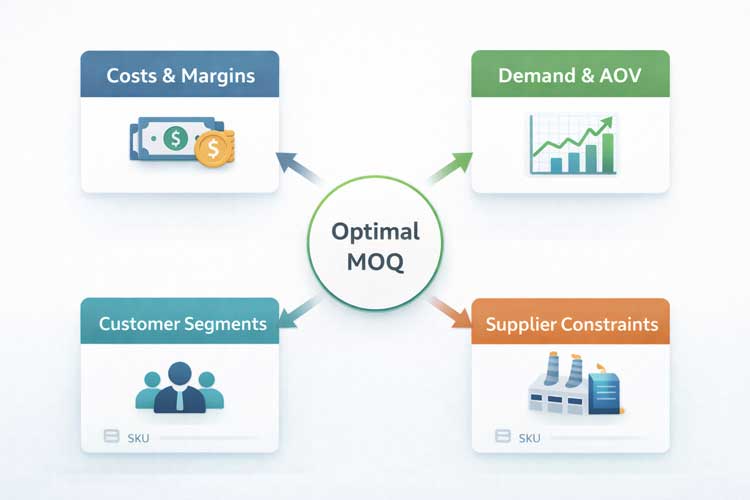
MOQ decisions without cost analysis are guesswork. To protect profits, anchor every Minimum Order Quantity to:
- Unit cost (COGS) – materials, labor, packaging
- Variable costs per order – picking, packing, transaction fees, shipping subsidies
- Relevant overhead – warehousing, staff, software, and a share of marketing
- Target wholesale margin – many wholesalers aim for 30–50% margins
If your per-order variable cost is $10 and your per-unit margin is $1, any order below 10 units erodes margin or becomes unprofitable.
A practical check:
- Compute profit per unit at wholesale price.
- Decide on a minimum profit per order.
- Set a Minimum Order Quantity so that:
MOQ × Profit per unit ≥ Minimum profit per order target
You can refine this by SKU and category, but this immediately screens out obviously unprofitable order sizes.
2. Use Demand, Inventory, and AOV Data to Fine-Tune MOQ
Costs give you the floor for a viable Minimum Order Quantity. Demand and order behavior help you choose a realistic level.
Key inputs:
- Historical demand by SKU and season
- Inventory turnover and stock age
- Average order value (AOV) for your store and niche
Global ecommerce AOV across many verticals tends to sit in the low hundreds of dollars, and WooCommerce stores often see higher AOV when they sell B2B or wholesale.
If your wholesale channel already averages high order values, you can support a higher Minimum Order Quantity without crushing demand. For new or small buyers, a lower MOQ may be a strategic investment in acquisition.
Practical approach:
- Map orders by units per order and revenue per order.
- Identify the order size where profit per order becomes strong and repeatable.
- Align your initial Minimum Order Quantity with that threshold, then A/B test small adjustments and monitor AOV, conversion, and churn.
3. Calibrate High vs Low MOQ by Customer Segment
There is no universal “good” MOQ; segmenting is essential:
- Enterprise / key accounts: Capable of higher Minimum Order Quantity in exchange for better pricing, payment terms, or exclusivity.
- Independent retailers / small buyers: Prefer lower or moderate Minimum Order Quantity, possibly at slightly higher prices.
A common pattern is tiered MOQs:
| Segment | MOQ Strategy Example |
| New small retailer | Low MOQ (e.g., 12–24 units) at base wholesale |
| Growing account | Medium MOQ (e.g., 48–96 units) with discounts |
| Key account / distributor | High MOQ (200+ units or $5,000+ per order) |
This way you:
- Remove friction for new accounts
- Encourage larger baskets from growing partners
- Lock in meaningful volume from your largest buyers
4. Combine MOQ with Tiered and Volume-Based Pricing
Minimum Order Quantity prevents losing money on small orders. Tiered pricing turns MOQ into a growth lever.
Volume-based tiered pricing often increases average order value significantly when done well. The logic:
- MOQ ensures each order is profitable.
- Tiered discounts encourage customers to move above the Minimum Order Quantity.
Example structure:
- MOQ: 24 units
- 24–49 units: standard wholesale price
- 50–99 units: 10% discount
- 100+ units: 20% discount
Buyers see a clear path to savings, and you get:
- Higher AOV
- Better production and fulfillment efficiency
- Lower per-unit handling and shipping costs
5. Set Product- and Category-Level MOQ Rules
Not all SKUs are equal. High-level, single-number MOQs can damage either profit or conversion.
Patterns that work well:
- Low-value items: Higher per-item Minimum Order Quantity (e.g., 10–20 units) to justify picking and packing time.
- Made-to-order or custom: MOQ reflects setup costs (e.g., print runs, molds) and may be substantially higher.
- Bulky or premium products: Lower MOQ per item but possibly a higher minimum order value because of freight or handling.
Many wholesalers mix:
- Order-wide Minimum Order Quantity (e.g., $300 minimum per order), and
- Per-product or per-category Minimum Order Quantity (e.g., at least 6 units per SKU, or 24 units per category).
6. Negotiate MOQ with Upstream Suppliers
Your own Minimum Order Quantity strategy is constrained by the MOQs your suppliers set for you. If a factory requires 1,000 units per run and your ideal lot size is 300 units, you’ll either overstock or negotiate.
Common tactics:
- Trial exceptions: Ask for lower MOQ on first runs to validate demand.
- Mixed or bundled MOQs: Negotiate total units across colors or SKUs instead of single-SKU MOQs.
- Higher unit cost for lower MOQ: Accept a higher unit price for smaller runs to reduce inventory risk.
- Align customer-facing MOQ to supplier MOQ: Ensure your wholesale MOQs help you sell through before products tie up capital or expire.
7. Use MOQ to Protect Cash Flow and Inventory Turnover
High order frequency with tiny basket sizes is a classic profit killer. Minimum Order Quantity helps by:
- Cutting unprofitable micro-orders
- Increasing AOV
- Supporting healthier inventory turnover
Practical levers:
- Link Minimum Order Quantity to free shipping thresholds.
- Encourage ordering by case or carton instead of individual units.
- Adjust Minimum Order Quantity seasonally where demand is highly cyclical.
8. Implement MOQ in WooCommerce with Whols
If you run WooCommerce, enforcing Minimum Order Quantity manually is error-prone. The Whols – WooCommerce Wholesale Prices plugin is designed to operationalize wholesale logic, including MOQ inside your store.
Key Whols features relevant to MOQ and profit protection include:
- Order Quantity Restriction (Core MOQ Control): Define a minimum order quantity that wholesale customers must meet to access wholesale pricing.
- Auto Apply Minimum Quantity: Automatically adjusts quantities in the cart so wholesale buyers meet your Minimum Order Quantity threshold without confusion.
- Enforce Minimum Cart Quantity Automatically: Apply Minimum Order Quantity rules at the cart level (items or total value) before checkout.
- Category-Wise and Role-Based Pricing: Configure category-wise wholesale prices and role-based category pricing, so MOQ and pricing tiers reflect the economics of each product line.
- Dynamic Wholesale Rules: Create dynamic rules for discounts, fees, BOGO offers, free shipping, and more based on cart total, product quantities, user role, and conditions. Combine MOQ with tiered pricing and shipping thresholds.
- Bulk Order Forms and Saved Lists: Offer bulk order forms and reusable order lists that make it easy for wholesale buyers to meet Minimum Order Quantity and reorder efficiently.
- Wholesale Access & Visibility Control: Restrict wholesale pricing, MOQ logic, and entire categories to approved wholesale customers only.
Together, these features turn Minimum Order Quantity into part of a broader wholesale operating system rather than a manual rule.
9. Measure and Optimize MOQ Over Time
MOQ is not “set and forget.” Treat it like any other pricing lever.
Key metrics:
- Average order value (AOV)
- Gross margin per order
- Conversion rate / quote-to-order conversion
- Inventory turnover and stockouts
- Behavior by customer segment
Best practices:
- Start conservative, then test higher and lower MOQs.
- Test different combinations (per-SKU vs order-wide minimum spend).
- Gather feedback from top customers and allow strategic exceptions.
- Review results quarterly and adjust for cost, demand, and strategy changes.
Common MOQ pitfalls
- Setting MOQ by gut feel instead of data: Leads to thresholds that are too low (unprofitable) or too high (kills conversion).
- Same MOQ across all SKUs: Ignores differences in margin, handling effort, and inventory risk.
- Opaque or confusing rules online: Modern B2B buyers expect self-service clarity. If your Minimum Order Quantity rules aren’t clearly visible or enforced automatically, you risk cart abandonment and support overhead.
- No segmentation by customer type: Treating a new boutique and an enterprise distributor the same leaves money on the table or blocks growth.
- Never revisiting MOQ: Costs, demand, and buyer behavior change. Stale MOQs gradually lose alignment with your economics.
Advanced Minimum Order Quantity strategies
- Hybrid MOQ + Minimum Spend: Combine a per-SKU Minimum Order Quantity with a minimum cart value. Ideal when you have many low-priced SKUs.
- First-Order vs Reorder MOQ: Lower Minimum Order Quantity for first orders to reduce friction, then increase for reorders once relationships are proven.
- Seasonal and Lifecycle-Based MOQ: Raise MOQs in peak seasons for efficiency; lower them to clear end-of-life stock.
- Dynamic MOQ Based on Inventory: Slightly lower MOQ when stock is high and demand is soft; raise it when supply is tight.
- Account Tier–Linked MOQ: Define Bronze/Silver/Gold account tiers where each level has its own Minimum Order Quantity and discount grid.
Whols- WooCommerce Wholesale Plugin
Manage your WooCommerce online store with more ease and efficiency with this feature-rich plugin.
Frequestion Asked Questions
1. What is a good Minimum Order Quantity for wholesale?
There is no universal “good” Minimum Order Quantity. A viable MOQ depends on your unit economics, target wholesale margin, and typical order size in your niche. As a starting point, set MOQ so that each order covers handling and overhead comfortably and delivers a healthy profit per order. Then adjust by product category and customer segment.
2. How does MOQ protect profit margins?
Minimum Order Quantity protects profits by:
1. Blocking very small, labor-intensive orders that lose money at wholesale prices
2. Encouraging larger baskets, which spread fixed costs across more units
3. Supporting tiered and volume-based pricing that reward bigger, more efficient orders
3. How do you calculate Minimum Order Quantity in practice?
A pragmatic approach is:
1. Calculate profit per unit at the intended wholesale price.
2. Estimate per-order handling and variable costs.
3. Decide on a minimum acceptable profit per order.
4. Set MOQ so that MOQ × profit per unit meets or exceeds that profit target.
You can then refine it using demand forecasts and EOQ models and by monitoring real-world behavior.
4. What is the difference between Minimum Order Quantity and EOQ?
MOQ is a constraint you set; EOQ is an internal optimization calculation.
1. Minimum Order Quantity (MOQ): The smallest amount a supplier or seller will accept in a single order, used as a profitability and efficiency safeguard.
2. Economic Order Quantity (EOQ): The theoretically optimal order quantity that minimizes total ordering plus holding costs, based on demand and cost assumptions.
5. How can I set Minimum Order Quantity in WooCommerce?
The easiest way to enforce MOQ in WooCommerce is with a dedicated wholesale plugin such as Whols – WooCommerce Wholesale Prices. With Whols you can:
1. Set minimum order quantities for wholesale customers.
2. Auto-apply minimum quantities when a product is added to cart.
3. Enforce minimum cart quantity or minimum spend.
4. Configure role- and category-based pricing to align MOQ with cost structure.
5. Use dynamic rules to combine MOQ with tiered discounts and free shipping.
This turns MOQ into a consistent, automated part of your store’s pricing and order logic.
Conclusion
Minimum Order Quantity is more than a line in your terms and conditions. When designed strategically, it becomes a profit-protection mechanism, a growth lever for average order value, and a key component of a modern, digital-first wholesale model.
To recap:
- Start with your economics COGS, handling costs, and target margins—then derive a data-backed Minimum Order Quantity.
- Segment by customer type and product category instead of relying on a single MOQ for everyone and everything.
- Combine Minimum Order Quantity with tiered pricing and smart incentives to push healthy order sizes rather than merely blocking small orders.
- Automate enforcement in your ecommerce stack. In WooCommerce, the Whols plugin lets you operationalize MOQ at product, category, role, and cart levels.
- Review and refine MOQs regularly as costs, demand, and buyer behavior evolve.
If you run a WooCommerce store and want to protect profits while delivering the frictionless self-service experience B2B buyers expect, your next steps are:
- Audit your current orders to find unprofitable patterns.
- Define initial MOQs by SKU, category, and customer segment.
- Configure these rules in a wholesale plugin like Whols.
- Monitor AOV, margin per order, and conversion, and optimize MOQs over time.
Done well, Minimum Order Quantity stops being a blunt tool and becomes a precise, data-backed instrument for profitable growth.